Showing posts with label windows. Show all posts

Wednesday, January 27, 2010

Tomboy 1.1.1 Released, Tomboy Online Plans Solidify

Tomboy 1.1.1 Brings New Ones

After a brief release hiatus, I bring you Tomboy's latest development release: version 1.1.1!

Probably the coolest new feature in this release, courtesy of Stefan Cosma, is support for Windows 7 Jump Lists, which are totally awesome and should be added to GNOME.

Jump Lists In Action


Another cool fix that will make Dave Richards (and everyone else who has ever wanted to copy and paste a Tomboy note into an email or OpenOffice.org document) very happy. Gabriel Burt fixed a long-standing problem with gtk# to enable this (requires not-yet-released gtk# 2.12.10), and patched Tomboy to make rich HTML available in the clipboard. Thanks dude!

Pasting rich note content into Evolution (click for OO.o Writer and plain-text email examples)


I was planning on having a preview of automatic background sync in this release, but I just didn't get as far as I wanted on it. I'll be merging that feature in before the next release, though.

But while I was playing with autosync, I was doing a lot of restarting Tomboy, and got tired of the 2 second startup time. Most Tomboy users always run it, so startup time is not a huge deal, but for developers this just gets irritating after awhile. So I rejiggered some startup work to be delayed, causing the Tomboy icon to show up within about 0.5-1.0 seconds on my machine. This pleased me, so I included it in Tomboy 1.1.1. Take that fascist scum!

The Future of Snowy and Tomboy Online

You may have seen Brad's blog last week about our Snowy meeting. If you read the meeting minutes, you'll see that we're shifting our focus to be a little more goal-oriented. Our plan is to get a Snowy instance on GNOME servers as soon as the sysadmin team will let us. This instance will be Tomboy Online, and its needs will drive core Snowy development. We'll start with a private alpha and go from there.

Right now we're working on a Tomboy Online roadmap that breaks outstanding work into basic tasks so that contributors know where they can help. Once this roadmap is in better shape, I'll be blogging again to let you know what our plans are and how you can help us.

In the meantime, if you have any resources to share on automated testing of web sites, REST APIs, and overall web/server security, I'd really appreciate it. Ponies are great...pwnies, not soo much.

By the way, if you have opinions about GNOME hosting Free web services like Tomboy Online, please take Stormy's survey on GNOME Foundation goals for 2010! :-)

Monday, April 20, 2009

Tomboy 0.14.1, the future, and a word about Gnote

Tomboy 0.14.1 Stable Release for Linux, Windows, and Mac OS X

I'm very proud to announce Tomboy 0.14.1, which represents the beginning of our stable support for Tomboy on all major desktop platforms. Here are some of the major changes since the 0.12.x stable versions:

Searching Notes in Windows


All in all this has been a pretty great cycle for Tomboy. Windows support has been the most-requested Tomboy feature for awhile, and in fact some of my first work on Tomboy three years ago was to make it work at my old Windows-only job. The Windows version has generated interest from a whole new set of users, but most importantly to me, it has gained us several new contributors! Benjamin Podszun, for example, rewrote printing to remove our dependence on the obsolete libgnomeprint, then went on to fix several other bugs and to triage the rest. Since I am not generally a Windows user, it is important to be able to depend on contributors from that world to keep an eye on things.

The Mac port is a little less mature, and we will probably need to get more involved in in the GTK+ implementation on that platform to ensure solid support. Nevertheless, though there are quirks, we are happy to support Tomboy on Mac OS X, too.

Tomboy in your dock (click for full-screen shot)


If you are a GNOME Do user, you may currently be enjoying the wonderful Tomboy plugin, which provides instant access to your notes, and convenient creation of new notes.

Instant note access with GNOME Do


With Tomboy 0.14.1 we have striven to create a solid base on which to build the future of Tomboy. Cross-platform support has given us new contributors and a cleaner code base. We have gotten rid of most of our use of obsolete GNOME APIs. We are off to a great start on profiling and making performance enhancements. Note synchronization is stable on all platforms. Now is the time to make Tomboy really shine.

Looking Forward

For Tomboy 0.16.0, we have a few more fun things planned. The community is having the planning meeting tomorrow, so we'll have our official roadmap soon, but some features I'm currently excited to work on are:
  • Automatic note synchronization between Tomboy(s), G1, iPhone, and the web.
  • Continued improvements to memory usage and overall performance, especially on startup (lots of low-hanging fruit here).
  • Figuring out how best to integrate with gnome-shell, which currently has no specific plans for applet support (which means it's a great time for us to figure out how to make applets awesome in GNOME 3.0!).
The great thing is that most of this work is easy to do in parallel, so now is a wonderful time to join in the hacking.

An old Tomboy Online mockup, stay tuned for news!


A Note about Gnote

Some people have started asking about Gnote, Hubert Figuiere's line-for-line port of Tomboy to C++. Our stance on Gnote is that it is counterproductive to maintain identical software in two languages. It will be harmful to the community, especially as these two apps inevitably diverge. It will result in duplication of effort, duplication of bugs, and a lot of wasted time for those who are trying to add value to the user experience.

Tomboy is not going away, and it will continue to be developed on the extremely productive Mono/GTK# language platform. Anyone thinking about distributing Gnote should consider the impact on users and their data. When we develop, we should always be asking ourselves, "is this adding value for our users?"

Tomboy has a vibrant community, a happy relationship with GNOME, and an exciting future. If you'd like to help us out come to tomorrow's planning meeting, join us on our mailing list, or just start hacking!

This post brought to you by the Tomboy Blogposter add-in.

Monday, January 26, 2009

Tomboy 0.13.3, Tomboy 0.12.2, Tasque 0.1.8, and Giver!

There have been some very important Tomboy and Tasque releases in the past month or so that I have neglected to share. I think it's true that Twitter removes a lot of the motivation to blog. Here are the takeaway points:

Shiki-Colors Theme (click for larger version)

So what else is going on? Tomboy 0.13.3 features some fixes that cut down my memory usage by 25% (with ~200 notes). It should also speed up start-up time if you have a big note collection. One user with 621 notes reported a change from 11 seconds to 4 seconds when he upgraded! The fixes were almost all related to extra work done on a per-note basis, so the memory and performance wins are most significant on these large note collections.

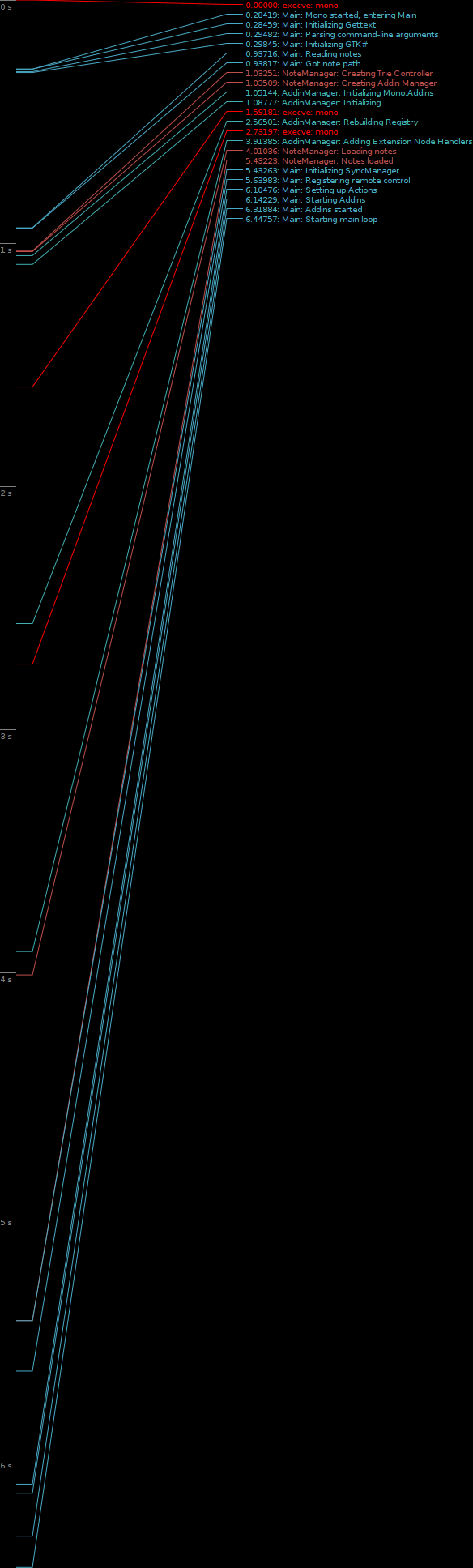
That being said, there is a lot more work to do on memory and performance. Ruben Vermeersch blogged about adapting Federico's timeline tracing tools to chart Tomboy start-up performance. This is going to be extremely helpful in figuring out where we're slowing things down. And as for memory usage, I have only fixed the low-hanging fruit; there are more wins to be had! If this is an area of computer science that you find fun, all help is welcome. :-)

Tomboy Startup (click for full-size graph)

My day job of working on the Mono Accessibility team has kept me pretty busy, and it's been hard lately to find time to work on Tomboy and Tasque. Sure, my team understands when I take a few hours every couple of weeks to prepare a Tomboy release, but that doesn't provide enough time for big feature work or difficult bug fixes. For example, we knew about the problems with Tasque and RememberTheMilk.com for a month before we were able to fix it and get a release out. Fortunately, Novell has its cool "ITO" (Innovation Time On) program. I accumulate 4 hours of ITO every week; that's basically the equivalent of 10% time! As I used up all of my regular time off with hospital visits last year, I scheduled four days of ITO during the week of Christmas. I was able to use that time to review a ton of outstanding patches for Tasque, fix the bugs in the RTM and SQLite backends, and make it easy to build on Windows and Mac OS X. This is also when I did all of the memory fixes for Tomboy. So a big thanks to Novell for supporting me in this work.

Lastly, I'm really excited about Ankit Jain's work on Giver. I never worked on Giver, unless you count the moral support I lent during that first Hackweek. :-) But I am amazed at how many people are asking for updates, Windows and Mac versions, etc. As somebody who works from home, Giver isn't that useful to me, but apparently it is very popular and more people are learning about it every day. With Ankit's help, this project may not be so dead after all. You can help him out by testing his Windows builds, trying latest SVN, filing issues, and hanging out in #giver on GIMPNet.

Monday, October 20, 2008

Tomboy Preview for Windows and Mac

Please To Try

At the end of August, I told you about my little project to bring Tomboy to Windows users. Well, last week I finally merged that code into trunk. And then Friday, the excellent Mono team released a Mono 2.0 installer for OS X, and I found that my Windows build of Tomboy finally worked pretty well on the Mac, too. Of course, some platform integration there would be nice...


Click for full-screen shots. Notice that I added a menu for tracking open note windows, and attached the classic recent notes menu to the dock icon. This is not the most elegant solution, but I wanted Mac users to play around with it and share their own opinions. I'm very open to changes here. :-)

I didn't have any plans this weekend, so I present to you "preview builds" of Tomboy 0.13.0 for Windows and Mac OS X. I'm distributing them with the disclaimer that they are not widely tested, though in my own testing I have found no bugs that would make me worry about loss of data. Just consider yourself warned, and please back up your notes.

If you find any bugs, or have ideas for better platform integration, or find issues with install, please please PLEASE file bugs!

Click to file a bug for Tomboy on Windows!

Click to file a bug for Tomboy on Mac OS X!

Mac Instructions
  1. Install Mono 2.0 for Mac OS X.
  2. Download and mount the Tomboy disk image.
  3. Drag Tomboy to Applications, run!
  4. (optional) Copy your notes to ~/.config/tomboy

Mac Known Issues
  • Shortcut keys all use Control instead of Command.
  • The Bugzilla add-in doesn't work.
  • In the note window toolbar, notebook names can be ellipsized oddly.
  • Hand cursor doesn't show when hovering over links, but they're still clickable.
  • No keybindings support.
  • No i18n support.

Windows Instructions
  1. Install Medsphere's GTK# SDK installer (the runtime installer should work, but in my testing it did not install a particular registry key needed for Tomboy to recognize its presence).
  2. If you are running Windows Vista, you may need to follow additional instructions to work around an installer bug.
  3. Restart your computer.
  4. Download the Tomboy installer.
  5. Double-click to install!
  6. (optional) Copy your notes to %appdata%\tomboy

Windows Known Issues
  • Menu rendering issues.
  • Two console windows appear briefly when Tomboy starts (fixed in Mono.Addins SVN).
  • No drag and drop from other apps into Tomboy (appears to be unimplemented in GTK+ for Windows).
  • If you try to run Tomboy twice, it should show the Search window instead of launching again, but sometimes it will not show the Search window until you have interacted with Tomboy in some other way (by hovering over a window or clicking the tray icon, for example).
  • No i18n support.

Big Thanks

This was actually a pretty easy job, thanks to these folks:
  • Eoin Hennessey, who pioneered a lot of this work in his banshee-osx git branch, which he and Aaron are merging into Banshee trunk this week. Among other things, he created Mono bindings for Imendio's excellent ige-mac-integration library, and scripts for building app bundles.
  • Andrew Jorgensen, Thomas Wiest, Marc Christensen, and Geoff Norton of the Mono team. These guys have been rocking hard on Mono's Mac story, and it shows. Thanks especially for getting me a build of MonoDevelop in time for my Saturday hack fest!
  • Aaron Bockover, who keeps threatening to do a Mac release before me.
  • Brad Taylor and his old Medsphere cronies, who whipped gtk-sharp on Windows into shape.
  • All GTK+ developers and porters, especially those at Imendio!
  • The entire Tomboy community, especially Dmitry Kostenko, Doug Johnston, and Samuel Vandamme for their patches to help make Tomboy on Windows a reality. You guys are awesome!

Tuesday, September 30, 2008

Touching Banshee, Porting Tasque

Toward a more clickable Banshee

I've written on a patch to make the artist and album text in the Banshee track info display interactive. 95% of the time I am listening to my library on shuffle, and sometimes I hear a song and decide I want to hear more from that artist or album. Well, with my patch, you can click on either to perform a search on your library.


You can also right-click and add the album or all tracks by the artist right to the play queue, which is my favorite Banshee trick now. Have you ever used the Banshee Play Queue? It's really cool...if you're listening on shuffle and you add a bunch of stuff to the play queue, it will play those items in order and then go back to shuffling through your library (or whatever you were listening to before you shoved stuff into the queue).


Click to see low-quality demo on YouTube.

So why is this still just a patch and not in Banshee SVN? Well, really, it's kind of ugly, don't you think? Here's this pretty Banshee UI with some gross hyperlink-looking text in the middle of it. What do you folks think I should do?
  • Use a different color, like "Selected"?

  • Only change the text color on hover?

  • Both?

The only thing I like right now about having it colored all the time is that it makes the feature more discoverable. But is it worth it? Any thoughts on the appearance or behavior of this feature? If you build Banshee from SVN, give it a try and see what you think!

I'm busy lately so if somebody else wants to mess with this bug, be my guest. It won't get into SVN until after Banshee 1.4 is released, anyway. ;-)


Tasque Goes Cross-Platform

I couldn't sleep Thursday night, so I yanked some of my code from tomboy-portable2 and got Tasque going on Windows. Then I decided Tasque is simple enough to play with that I'd better get it going on Mac OS X, too. This weekend I even put together I nice little disk image for Mac users. Big thanks to Eoin Hennessy for creating Mono bindings to Immendio's Mac/GTK+ integration library. The next Tasque release will be equally supported on Linux, Windows, and Mac, so feel free to start filing bugs.


Really this is just an excuse to try stuff out for Tomboy.

Thursday, August 28, 2008

Hack Week III: Tomboy Joins The Dark Side

Tomboy on Windows Where It Belongs

As you all know, my job here at Novell is to migrate all worthwhile desktop Linux applications off of that ridiculous platform and onto Windows so that we can do away with this nasty open source stuff. Unfortunately I haven't yet gotten the paper work to close up my code for the latest victim of this effort, so for now dirty open source hippies can get it here:

http://svn.gnome.org/svn/tomboy/branches/tomboy-portable2/

Somebody even impersonated me and posted instructions and current limitations on our mailing list (soon to be replaced with a 1-900 number offering support for a reasonable fee).

And here's an image of what it looks like. Windows has a really awesome feature where you can press your "Print Screen" button, and then you dig around in the menus to find the excellent Microsoft Paint application, at which point you recall that you can produce a "screen shot" by "pasting". Then you save in one of a myriad of excellent file formats, and you have an image of what you were doing on your computer! You can then share it with your friends like so:


What do you think? Excited to end the Linux charade and switch to a solid and hip platform like Vista? Woo!

I feel very silly today.

Utah Open Source Conference

I was fortunate enough to get to join my friends and coworkers in Provo for this Hack Week. I normally work from my home office, so I'm having a blast seeing everybody. Today we're working at Salt Lake Community College as part of the Utah Open Source Conference. I'm actually talking with my buddy Brian Merrell about the efforts of the Mono a11y team (you know, my actual job). It should be fun, we've got some neat slides and we are both cool people so I don't really see what could go wrong. The UTOSC team has done a ridiculously awesome job setting up this conference, so I'm really excited to see everything come to fruition. We had a sweet speaker dinner last night but moron that I am I forgot my camera so you just have to take my word for it!

This Tomboy stuff still needs a bit of work so off I go. Hopefully having Tomboy run on more platforms will help us attract more users and developers. I know it's a popular request so I'm pretty serious about getting it supported in trunk. Later guys!