Monday, January 26, 2009

Tomboy 0.13.3, Tomboy 0.12.2, Tasque 0.1.8, and Giver!

There have been some very important Tomboy and Tasque releases in the past month or so that I have neglected to share. I think it's true that Twitter removes a lot of the motivation to blog. Here are the takeaway points:

Shiki-Colors Theme (click for larger version)

So what else is going on? Tomboy 0.13.3 features some fixes that cut down my memory usage by 25% (with ~200 notes). It should also speed up start-up time if you have a big note collection. One user with 621 notes reported a change from 11 seconds to 4 seconds when he upgraded! The fixes were almost all related to extra work done on a per-note basis, so the memory and performance wins are most significant on these large note collections.

That being said, there is a lot more work to do on memory and performance. Ruben Vermeersch blogged about adapting Federico's timeline tracing tools to chart Tomboy start-up performance. This is going to be extremely helpful in figuring out where we're slowing things down. And as for memory usage, I have only fixed the low-hanging fruit; there are more wins to be had! If this is an area of computer science that you find fun, all help is welcome. :-)
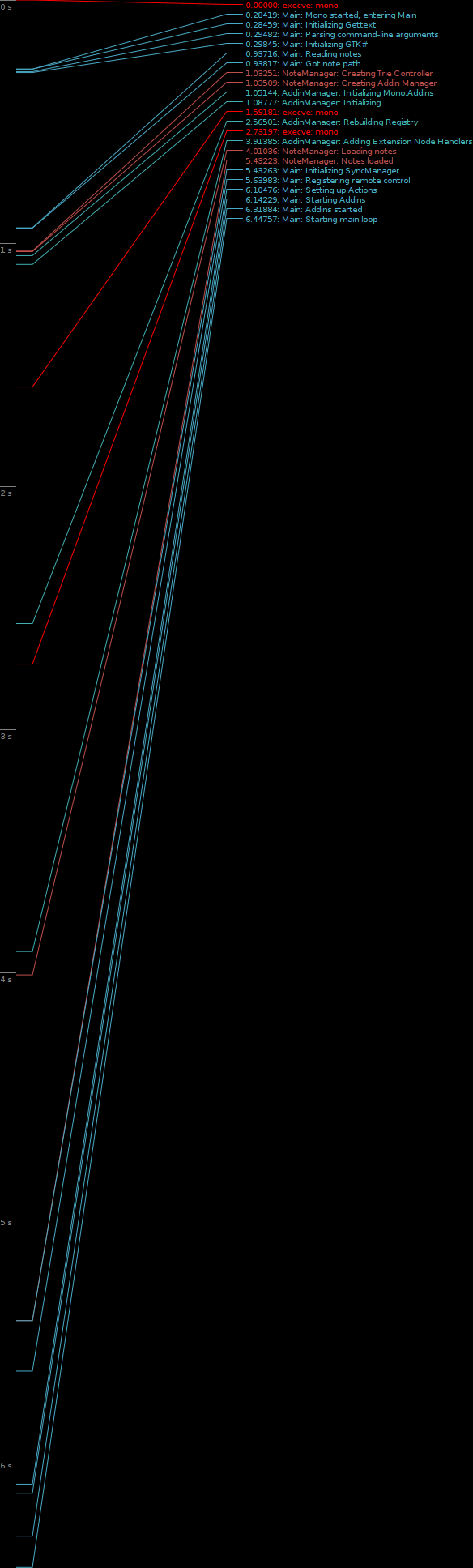
Tomboy Startup (click for full-size graph)

My day job of working on the Mono Accessibility team has kept me pretty busy, and it's been hard lately to find time to work on Tomboy and Tasque. Sure, my team understands when I take a few hours every couple of weeks to prepare a Tomboy release, but that doesn't provide enough time for big feature work or difficult bug fixes. For example, we knew about the problems with Tasque and RememberTheMilk.com for a month before we were able to fix it and get a release out. Fortunately, Novell has its cool "ITO" (Innovation Time On) program. I accumulate 4 hours of ITO every week; that's basically the equivalent of 10% time! As I used up all of my regular time off with hospital visits last year, I scheduled four days of ITO during the week of Christmas. I was able to use that time to review a ton of outstanding patches for Tasque, fix the bugs in the RTM and SQLite backends, and make it easy to build on Windows and Mac OS X. This is also when I did all of the memory fixes for Tomboy. So a big thanks to Novell for supporting me in this work.

Lastly, I'm really excited about Ankit Jain's work on Giver. I never worked on Giver, unless you count the moral support I lent during that first Hackweek. :-) But I am amazed at how many people are asking for updates, Windows and Mac versions, etc. As somebody who works from home, Giver isn't that useful to me, but apparently it is very popular and more people are learning about it every day. With Ankit's help, this project may not be so dead after all. You can help him out by testing his Windows builds, trying latest SVN, filing issues, and hanging out in #giver on GIMPNet.

Wednesday, November 26, 2008

Mono Accessibility 0.9 Released!

Yesterday, Brad announced the first release of the Mono Accessibility team's work, which started a little less than a year ago. It's pretty exciting for us to put out this developer preview release; I'm interested to see what people make of it.

The goal of the first phase of our project, which will culminate in a 1.0 release early next year, is to make Winforms applications accessible in Linux with traditional at-spi tools like Orca and Accerciser. In 0.9, we offer support for most Winforms controls (Button, Label, ComboBox, ToolStrip, WebBrowser, etc). In 1.0, we will be rounding out this support to include the remaining controls (DataGridView, TreeView, custom controls, etc), in addition to fixing bugs and improving stability.

It may not sound that exciting to enable accessibility for Winforms apps. After all, you probably aren't using very many on your GNOME desktop today. However, there certainly are some cool open source apps out there (Paint.NET, NClass, etc). And the main benefit will be for overall Linux adoption. There are many businesses, large and small, schools, governments, non-profits, etc...that are stuck on Windows because they have custom applications written using APIs like Winforms. One goal of the Mono project is to provide a migration path for these potential Linux users. Accessibility support is often a requirement, so by making these custom Winforms applications fully accessible in Linux, we are enabling Linux adoption scenarios that would have been too expensive before (rewriting your internal tools is not cheap or easy).

If you are not familiar with our project, let me briefly explain what it is we are doing:

We are implementing Microsoft's "User Interface Automation" (UIA) specification on Linux. During the first phase of our project, we are focusing on the "provider side" of this specification, which offers interfaces that are implemented by the accessibility/automation "provider" for a given control. This is similar to implementing ATK interfaces for a GTK+ widget, if you are familiar with that. We have been writing UIA providers for all of the Winforms controls.

The other half of our work this phase has been creating a bridge from UIA to ATK. This bridge translates between UIA interfaces and ATK roles/states/etc. This is the piece that makes a Winforms application look like a GTK+ app (or any other app written in a toolkit that exposes a11y info over at-spi) in a tool like Orca.


It's pretty cool the way this fits together. Next year, after 1.0 is released, we'll begin the second phase of our project. It includes two major efforts:

First, we will be making Moonlight accessible in the same way we have made Winforms applications accessible. We will create UIA providers for Moonlight controls, and they will automatically gain accessibility via the exiting UIA<->ATK bridge.

Second, we will implement the "client side" of the UIA specification. This is a set of interfaces designed to allow an accessibility tool (think Orca) to interact with accessible applications. It is similar to the at-spi interfaces, and we will in fact be implementing it as another bridge, this time translating "client" UIA calls into equivalent at-spi calls. The benefit here is that as Windows developers create accessibility and automation tools using the UIA interfaces, they will be portable to Linux (and vice versa).

Accessibility is a great feature for users and potential customers. Automation support is invaluable to testers, software QA, and even users who just want to streamline common tasks. With the release of Mono Accessibility 0.9, we are growing the landscape of accessible applications. We look forward to your feedback (and bug reports)!

Monday, October 27, 2008

Got a G1, Yay Linux!

So I caved and got a G1. I may write an in-depth review after I've had it longer, or I may not, but here are the highlights:

Rock
  • I can has source!
  • No need to print from Google Maps when I leave the house.
  • Better reception in my house with T-Mobile than I had with AT&T.
  • ConnectBot SSH client works great with my screen+irssi setup.
  • Used ShopSavvy at Sports Authority yesterday to convince Ellery it was worth getting her a shiny new pair of rollerblades. Hold phone up to barcode, see local and online price comparisons.
  • Used Shazam to find out what's playing on the radio. Hold phone up to speaker, wait a few seconds, prompted with all the info you could desire, including a link to download via phone at Amazon MP3 store.
  • Unlock screen shows when my alarm is set to go off.
  • Keyboard surprisingly comfortable to use.
  • Camera image quality decent.
  • Easier than I thought to patch HAL (or just edit .is_audio_player) so that G1 Just Works in Banshee:

G1 in Banshee
Click for larger view, obligatory F-Spot Awesomeness

Suck
  • My thumbs are a bit fat to use on the touch screen (I have somewhat-deformed wide thumbs). So, no one-handed use.
  • No visual voice mail.
  • When interacting with a phone service, like voicemail, and you are prompted to enter digits, I go into freak-out mode, because I look at the screen and it is blank, so I have to unlock, then find the dialer so I can hit a number, which can be kind of tricky depending on how the call started. I can probably flip out the keyboard and use that, but as I said, I'm in a panic.
  • Not sure how to carry this thing. It comes with a sleeve/pouch/thingy, and for now I put it in there and then in my pocket, but now it takes two hands and an extra few seconds to answer my phone. What do people do? I'm used to having a crappy phone that can live in the same pocket as keys and other dangerous items!
  • Camera slow, worthless in low-light situations.

Really looking forward to Tomdroid!

Wednesday, October 22, 2008

Tomboy Planning Meeting Tomorrow

In case anybody's interested, we're having our planning meeting for this development cycle in #tomboy tomorrow...

Thursday, October 23, 2008 at 1930 UTC
http://www.timeanddate.com/worldclock/fixedtime.html?month=10&day=23&year=2008&hour=12&min=30&sec=0&p1=224

That's 12:30 PM PDT, 8:30 PM BST, etc etc.

Everybody is welcome! We've started a wiki page to gather ideas before
holding the meeting, so check it out here, and add your name if you're
attending, along with any ideas you might have:

http://live.gnome.org/Tomboy/DevMeetingZeroPointFourteen

Topics to dicuss:
* Features for this cycle
* Cross-platform updates
* Plans for bug/patch days to clean up bugzilla

My personal goals for this cycle:
* Solid Windows binaries with every 0.13.x release
* Experimental Mac binaries with every 0.13.x release
* Power through bugzilla, with a major focus on memory/performance
issues and other long-standing embarrassing bugs (like note renaming
problems).
* Better community management on my part, frequent bug/patch days, not
letting patches rot in bugzilla. Basically, enabling our awesome
contributors instead of frustrating them!

Monday, October 20, 2008

Tomboy Preview for Windows and Mac

Please To Try

At the end of August, I told you about my little project to bring Tomboy to Windows users. Well, last week I finally merged that code into trunk. And then Friday, the excellent Mono team released a Mono 2.0 installer for OS X, and I found that my Windows build of Tomboy finally worked pretty well on the Mac, too. Of course, some platform integration there would be nice...


Click for full-screen shots. Notice that I added a menu for tracking open note windows, and attached the classic recent notes menu to the dock icon. This is not the most elegant solution, but I wanted Mac users to play around with it and share their own opinions. I'm very open to changes here. :-)

I didn't have any plans this weekend, so I present to you "preview builds" of Tomboy 0.13.0 for Windows and Mac OS X. I'm distributing them with the disclaimer that they are not widely tested, though in my own testing I have found no bugs that would make me worry about loss of data. Just consider yourself warned, and please back up your notes.

If you find any bugs, or have ideas for better platform integration, or find issues with install, please please PLEASE file bugs!

Click to file a bug for Tomboy on Windows!

Click to file a bug for Tomboy on Mac OS X!

Mac Instructions
  1. Install Mono 2.0 for Mac OS X.
  2. Download and mount the Tomboy disk image.
  3. Drag Tomboy to Applications, run!
  4. (optional) Copy your notes to ~/.config/tomboy

Mac Known Issues
  • Shortcut keys all use Control instead of Command.
  • The Bugzilla add-in doesn't work.
  • In the note window toolbar, notebook names can be ellipsized oddly.
  • Hand cursor doesn't show when hovering over links, but they're still clickable.
  • No keybindings support.
  • No i18n support.

Windows Instructions
  1. Install Medsphere's GTK# SDK installer (the runtime installer should work, but in my testing it did not install a particular registry key needed for Tomboy to recognize its presence).
  2. If you are running Windows Vista, you may need to follow additional instructions to work around an installer bug.
  3. Restart your computer.
  4. Download the Tomboy installer.
  5. Double-click to install!
  6. (optional) Copy your notes to %appdata%\tomboy

Windows Known Issues
  • Menu rendering issues.
  • Two console windows appear briefly when Tomboy starts (fixed in Mono.Addins SVN).
  • No drag and drop from other apps into Tomboy (appears to be unimplemented in GTK+ for Windows).
  • If you try to run Tomboy twice, it should show the Search window instead of launching again, but sometimes it will not show the Search window until you have interacted with Tomboy in some other way (by hovering over a window or clicking the tray icon, for example).
  • No i18n support.

Big Thanks

This was actually a pretty easy job, thanks to these folks:
  • Eoin Hennessey, who pioneered a lot of this work in his banshee-osx git branch, which he and Aaron are merging into Banshee trunk this week. Among other things, he created Mono bindings for Imendio's excellent ige-mac-integration library, and scripts for building app bundles.
  • Andrew Jorgensen, Thomas Wiest, Marc Christensen, and Geoff Norton of the Mono team. These guys have been rocking hard on Mono's Mac story, and it shows. Thanks especially for getting me a build of MonoDevelop in time for my Saturday hack fest!
  • Aaron Bockover, who keeps threatening to do a Mac release before me.
  • Brad Taylor and his old Medsphere cronies, who whipped gtk-sharp on Windows into shape.
  • All GTK+ developers and porters, especially those at Imendio!
  • The entire Tomboy community, especially Dmitry Kostenko, Doug Johnston, and Samuel Vandamme for their patches to help make Tomboy on Windows a reality. You guys are awesome!

Tuesday, September 30, 2008

Touching Banshee, Porting Tasque

Toward a more clickable Banshee

I've written on a patch to make the artist and album text in the Banshee track info display interactive. 95% of the time I am listening to my library on shuffle, and sometimes I hear a song and decide I want to hear more from that artist or album. Well, with my patch, you can click on either to perform a search on your library.


You can also right-click and add the album or all tracks by the artist right to the play queue, which is my favorite Banshee trick now. Have you ever used the Banshee Play Queue? It's really cool...if you're listening on shuffle and you add a bunch of stuff to the play queue, it will play those items in order and then go back to shuffling through your library (or whatever you were listening to before you shoved stuff into the queue).


Click to see low-quality demo on YouTube.

So why is this still just a patch and not in Banshee SVN? Well, really, it's kind of ugly, don't you think? Here's this pretty Banshee UI with some gross hyperlink-looking text in the middle of it. What do you folks think I should do?
  • Use a different color, like "Selected"?

  • Only change the text color on hover?

  • Both?

The only thing I like right now about having it colored all the time is that it makes the feature more discoverable. But is it worth it? Any thoughts on the appearance or behavior of this feature? If you build Banshee from SVN, give it a try and see what you think!

I'm busy lately so if somebody else wants to mess with this bug, be my guest. It won't get into SVN until after Banshee 1.4 is released, anyway. ;-)


Tasque Goes Cross-Platform

I couldn't sleep Thursday night, so I yanked some of my code from tomboy-portable2 and got Tasque going on Windows. Then I decided Tasque is simple enough to play with that I'd better get it going on Mac OS X, too. This weekend I even put together I nice little disk image for Mac users. Big thanks to Eoin Hennessy for creating Mono bindings to Immendio's Mac/GTK+ integration library. The next Tasque release will be equally supported on Linux, Windows, and Mac, so feel free to start filing bugs.


Really this is just an excuse to try stuff out for Tomboy.

Tuesday, September 23, 2008

Tomboy 0.12.0 Released

Yesterday I unleashed the latest stable Tomboy release. This has been a less active cycle than usual, but in 0.12.0 you can experience the wonder of:

  • New Tasque add-in

  • Add "New notebook..." menu item to Notebook toolbar button

  • Many fixes to note synchronization

  • Improvements to Bugzilla and HTML Export add-ins

  • Tray icon ported to Gtk.StatusIcon

  • Support for --debug, --trace, and --profile when running Tomboy
The following contributors were especially helpful in making Tomboy 0.12.0 happen: Boyd Timothy, Alex Graveley, Alexey Nedilko, John Anderson, John Carr, Jon Lund Steffensen, Łukasz Jernaś, Romain Tartiere, Sebastian Dröge, Stefan Cosma, and Stefan Schweizer. A big thank you to them, and to our hard-working translators, too!

The lack of activity during the 0.11.x cycle has disturbed me (especially because it's mostly my fault!), and I've written to our mailing list about how I think we can do better this cycle. One easy way you can help is by voting for your "favorite" Tomboy bugs.

I'll write more about plans for our next stable release after we have our dev meeting, but you can be sure that I haven't forgotten our proprietary compatriots. I'll be merging the tomboy-portable2 branch into trunk Real Soon Now.