Tuesday, April 21, 2009

Tomboy Notes on Android: Olivier Bilodeau Releases Tomdroid 0.1.0

During the fall, Olivier showed up on tomboy-list announcing a school project he would be working on: Tomdroid, a Tomboy note reader (and eventually editor) for the Android mobile platform that drives the wonderful G1 phone. After a few months of development, the first "baby-eating" release is available for testing. Olivier mentions a number of nasty little bugs in this first release, but he is already working on fixing them, and people are already starting to poke around with the code and find ways to help.

Tomdroid: Tomboy Notes on Android

Obviously, having access to your Tomboy notes on your mobile phone is a huge win. Even when they are read-only, you can:
  • Access your grocery list without having to call your wife (which only proves that you weren't listening in the first place)
  • Quickly access your notes about obscure system configurations when visiting a client site, instead of googling (ever worked for a client who stood over you shoulder, and wasn't too impressed by your frequent googling?)
  • For me, I often forget to add contacts and calendar events until I am repeatedly burned, but it's pretty common to have that info floating around in my Tomboy notes.
  • And the number one win: you can have the schizophrenic dude next to you on the bus review the draft of your latest blog post (this keeps him busy, making it less likely he will stab you in the face)

See? Tomdroid just saved your life.

As a G1 owner, I'm extremely excited about this project. I downloaded the Android SDK just so I could start playing around with the code. Olivier has communicated extensively with us on tomboy-list and in #tomboy, and one of the really nice things he's done is initial work on an XML schema for the Tomboy note format. This will be extremely useful to maintain, as it is inevitable that Tomboy notes will being to be read and edited via interesting new clients.

If you're looking for a fun (because it's Tomboy-related) and hip (because it's mobile) project to work on, I recommend spending some time with Tomdroid. New projects are always fun, for example you could work on tighter integration with phone features (like phone numbers, contacts, calendar, and web), or you can start playing with note editing (maybe a nerdy markdown editor would be a good fit?).

Ideas for getting your notes onto your G1:
  • Manually copy ~/.tomboy/*.note to your G1 periodically. Verdict: Lame
  • Write Tomboy add-in that hooks into HAL, notices when a G1 is connected, offers to push notes to phone (could be a button that appears in the note toolbar, a libnotify bubble, or even a totally automatic process). Verdict: Instant win, minus the requirement to plug in your phone.
  • Implement Tomboy online service, and corresponding sync functionality in Tomdroid. Verdict: Epic win, may not be ready for a few months.

Pushing your notes to the G1

Those are great ideas. While drafting this post last night I really liked the second one, so here you can download my quick hack job that Gets It Done. Drop Tomdroid.dll into ~/.tomboy/addins, or `make && make install`. Many thanks to James Wilcox for his incredible vision and Aaron Bockover for all the Banshee code I stole to make interacting with HAL devices brain-dead simple. Right now you just get an item in the Tools menu in the note window, but clearly there are better things that could be done. Patches welcome, I'll dump this into git as soon as I get rid of the excess Banshee code I brought in.

This post brought to you by the Tomboy Blogposter add-in.

Monday, April 20, 2009

Tomboy 0.14.1, the future, and a word about Gnote

Tomboy 0.14.1 Stable Release for Linux, Windows, and Mac OS X

I'm very proud to announce Tomboy 0.14.1, which represents the beginning of our stable support for Tomboy on all major desktop platforms. Here are some of the major changes since the 0.12.x stable versions:

Searching Notes in Windows


All in all this has been a pretty great cycle for Tomboy. Windows support has been the most-requested Tomboy feature for awhile, and in fact some of my first work on Tomboy three years ago was to make it work at my old Windows-only job. The Windows version has generated interest from a whole new set of users, but most importantly to me, it has gained us several new contributors! Benjamin Podszun, for example, rewrote printing to remove our dependence on the obsolete libgnomeprint, then went on to fix several other bugs and to triage the rest. Since I am not generally a Windows user, it is important to be able to depend on contributors from that world to keep an eye on things.

The Mac port is a little less mature, and we will probably need to get more involved in in the GTK+ implementation on that platform to ensure solid support. Nevertheless, though there are quirks, we are happy to support Tomboy on Mac OS X, too.

Tomboy in your dock (click for full-screen shot)


If you are a GNOME Do user, you may currently be enjoying the wonderful Tomboy plugin, which provides instant access to your notes, and convenient creation of new notes.

Instant note access with GNOME Do


With Tomboy 0.14.1 we have striven to create a solid base on which to build the future of Tomboy. Cross-platform support has given us new contributors and a cleaner code base. We have gotten rid of most of our use of obsolete GNOME APIs. We are off to a great start on profiling and making performance enhancements. Note synchronization is stable on all platforms. Now is the time to make Tomboy really shine.

Looking Forward

For Tomboy 0.16.0, we have a few more fun things planned. The community is having the planning meeting tomorrow, so we'll have our official roadmap soon, but some features I'm currently excited to work on are:
  • Automatic note synchronization between Tomboy(s), G1, iPhone, and the web.
  • Continued improvements to memory usage and overall performance, especially on startup (lots of low-hanging fruit here).
  • Figuring out how best to integrate with gnome-shell, which currently has no specific plans for applet support (which means it's a great time for us to figure out how to make applets awesome in GNOME 3.0!).
The great thing is that most of this work is easy to do in parallel, so now is a wonderful time to join in the hacking.

An old Tomboy Online mockup, stay tuned for news!


A Note about Gnote

Some people have started asking about Gnote, Hubert Figuiere's line-for-line port of Tomboy to C++. Our stance on Gnote is that it is counterproductive to maintain identical software in two languages. It will be harmful to the community, especially as these two apps inevitably diverge. It will result in duplication of effort, duplication of bugs, and a lot of wasted time for those who are trying to add value to the user experience.

Tomboy is not going away, and it will continue to be developed on the extremely productive Mono/GTK# language platform. Anyone thinking about distributing Gnote should consider the impact on users and their data. When we develop, we should always be asking ourselves, "is this adding value for our users?"

Tomboy has a vibrant community, a happy relationship with GNOME, and an exciting future. If you'd like to help us out come to tomorrow's planning meeting, join us on our mailing list, or just start hacking!

This post brought to you by the Tomboy Blogposter add-in.

Monday, February 16, 2009

Tomboy 0.13.5 Brings a Better Windows Installation Experience

Today I released Tomboy 0.13.5. It has a bunch of nice fixes, including updates to Benjamin Podszun's Gtk.Print rewrite of Tomboy's printing add-in (making printing available on all platforms). For Windows users, this is the first time that you should be able to easily install gtk-sharp and Tomboy without having to muck around with your system. But we wouldn't want it to be too easy, so there are some caveats.

From http://live.gnome.org/Tomboy/Installing/Windows :

Instructions for installing a Tomboy Windows release

Upgrading from Tomboy 0.13.4 or earlier
  1. Uninstall Tomboy.
  2. Uninstall any existing versions of gtk-sharp you may have installed.
  3. Continue with Installation instructions.
Installation
  1. Install Novell's gtk-sharp 2.12.8 or newer.
  2. Restart.
  3. Run Tomboy installer 0.13.5 or newer.
  4. Enjoy!
Importing notes from Linux (optional)
  1. On your Linux box, copy all of the *.note files out of ~/.tomboy .
  2. On your Windows box, quit Tomboy.
  3. On your Windows box, copy all the *.note files from Linux into %APPDATA%\tomboy .
Please please please don't hesitate to file bugs for any problems you experience.

Thanks so much to Mike Kestner for working his ass off (on his own time) updating the gtk-sharp installers, making them easier to develop and build, and fixing the issues reported by Tomboy users. Apps like Tomboy, Banshee, and GNOME Do would simply not exist without all of his hard work.

Monday, January 26, 2009

Tomboy 0.13.3, Tomboy 0.12.2, Tasque 0.1.8, and Giver!

There have been some very important Tomboy and Tasque releases in the past month or so that I have neglected to share. I think it's true that Twitter removes a lot of the motivation to blog. Here are the takeaway points:

Shiki-Colors Theme (click for larger version)

So what else is going on? Tomboy 0.13.3 features some fixes that cut down my memory usage by 25% (with ~200 notes). It should also speed up start-up time if you have a big note collection. One user with 621 notes reported a change from 11 seconds to 4 seconds when he upgraded! The fixes were almost all related to extra work done on a per-note basis, so the memory and performance wins are most significant on these large note collections.

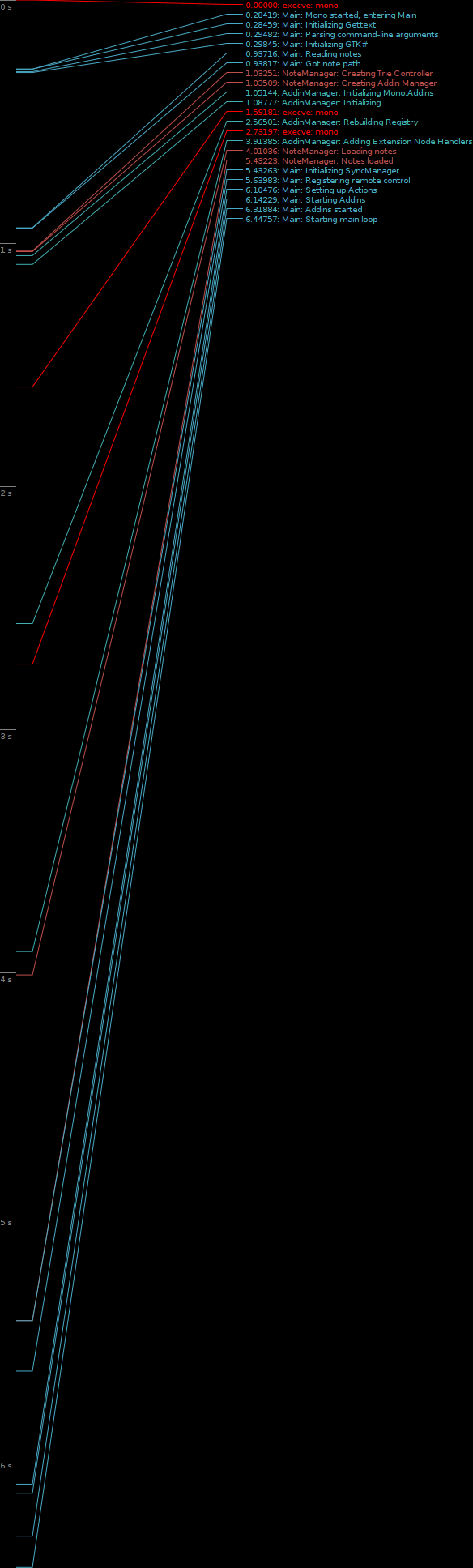
That being said, there is a lot more work to do on memory and performance. Ruben Vermeersch blogged about adapting Federico's timeline tracing tools to chart Tomboy start-up performance. This is going to be extremely helpful in figuring out where we're slowing things down. And as for memory usage, I have only fixed the low-hanging fruit; there are more wins to be had! If this is an area of computer science that you find fun, all help is welcome. :-)

Tomboy Startup (click for full-size graph)

My day job of working on the Mono Accessibility team has kept me pretty busy, and it's been hard lately to find time to work on Tomboy and Tasque. Sure, my team understands when I take a few hours every couple of weeks to prepare a Tomboy release, but that doesn't provide enough time for big feature work or difficult bug fixes. For example, we knew about the problems with Tasque and RememberTheMilk.com for a month before we were able to fix it and get a release out. Fortunately, Novell has its cool "ITO" (Innovation Time On) program. I accumulate 4 hours of ITO every week; that's basically the equivalent of 10% time! As I used up all of my regular time off with hospital visits last year, I scheduled four days of ITO during the week of Christmas. I was able to use that time to review a ton of outstanding patches for Tasque, fix the bugs in the RTM and SQLite backends, and make it easy to build on Windows and Mac OS X. This is also when I did all of the memory fixes for Tomboy. So a big thanks to Novell for supporting me in this work.

Lastly, I'm really excited about Ankit Jain's work on Giver. I never worked on Giver, unless you count the moral support I lent during that first Hackweek. :-) But I am amazed at how many people are asking for updates, Windows and Mac versions, etc. As somebody who works from home, Giver isn't that useful to me, but apparently it is very popular and more people are learning about it every day. With Ankit's help, this project may not be so dead after all. You can help him out by testing his Windows builds, trying latest SVN, filing issues, and hanging out in #giver on GIMPNet.

Wednesday, November 26, 2008

Mono Accessibility 0.9 Released!

Yesterday, Brad announced the first release of the Mono Accessibility team's work, which started a little less than a year ago. It's pretty exciting for us to put out this developer preview release; I'm interested to see what people make of it.

The goal of the first phase of our project, which will culminate in a 1.0 release early next year, is to make Winforms applications accessible in Linux with traditional at-spi tools like Orca and Accerciser. In 0.9, we offer support for most Winforms controls (Button, Label, ComboBox, ToolStrip, WebBrowser, etc). In 1.0, we will be rounding out this support to include the remaining controls (DataGridView, TreeView, custom controls, etc), in addition to fixing bugs and improving stability.

It may not sound that exciting to enable accessibility for Winforms apps. After all, you probably aren't using very many on your GNOME desktop today. However, there certainly are some cool open source apps out there (Paint.NET, NClass, etc). And the main benefit will be for overall Linux adoption. There are many businesses, large and small, schools, governments, non-profits, etc...that are stuck on Windows because they have custom applications written using APIs like Winforms. One goal of the Mono project is to provide a migration path for these potential Linux users. Accessibility support is often a requirement, so by making these custom Winforms applications fully accessible in Linux, we are enabling Linux adoption scenarios that would have been too expensive before (rewriting your internal tools is not cheap or easy).

If you are not familiar with our project, let me briefly explain what it is we are doing:

We are implementing Microsoft's "User Interface Automation" (UIA) specification on Linux. During the first phase of our project, we are focusing on the "provider side" of this specification, which offers interfaces that are implemented by the accessibility/automation "provider" for a given control. This is similar to implementing ATK interfaces for a GTK+ widget, if you are familiar with that. We have been writing UIA providers for all of the Winforms controls.

The other half of our work this phase has been creating a bridge from UIA to ATK. This bridge translates between UIA interfaces and ATK roles/states/etc. This is the piece that makes a Winforms application look like a GTK+ app (or any other app written in a toolkit that exposes a11y info over at-spi) in a tool like Orca.


It's pretty cool the way this fits together. Next year, after 1.0 is released, we'll begin the second phase of our project. It includes two major efforts:

First, we will be making Moonlight accessible in the same way we have made Winforms applications accessible. We will create UIA providers for Moonlight controls, and they will automatically gain accessibility via the exiting UIA<->ATK bridge.

Second, we will implement the "client side" of the UIA specification. This is a set of interfaces designed to allow an accessibility tool (think Orca) to interact with accessible applications. It is similar to the at-spi interfaces, and we will in fact be implementing it as another bridge, this time translating "client" UIA calls into equivalent at-spi calls. The benefit here is that as Windows developers create accessibility and automation tools using the UIA interfaces, they will be portable to Linux (and vice versa).

Accessibility is a great feature for users and potential customers. Automation support is invaluable to testers, software QA, and even users who just want to streamline common tasks. With the release of Mono Accessibility 0.9, we are growing the landscape of accessible applications. We look forward to your feedback (and bug reports)!

Monday, October 27, 2008

Got a G1, Yay Linux!

So I caved and got a G1. I may write an in-depth review after I've had it longer, or I may not, but here are the highlights:

Rock
  • I can has source!
  • No need to print from Google Maps when I leave the house.
  • Better reception in my house with T-Mobile than I had with AT&T.
  • ConnectBot SSH client works great with my screen+irssi setup.
  • Used ShopSavvy at Sports Authority yesterday to convince Ellery it was worth getting her a shiny new pair of rollerblades. Hold phone up to barcode, see local and online price comparisons.
  • Used Shazam to find out what's playing on the radio. Hold phone up to speaker, wait a few seconds, prompted with all the info you could desire, including a link to download via phone at Amazon MP3 store.
  • Unlock screen shows when my alarm is set to go off.
  • Keyboard surprisingly comfortable to use.
  • Camera image quality decent.
  • Easier than I thought to patch HAL (or just edit .is_audio_player) so that G1 Just Works in Banshee:

G1 in Banshee
Click for larger view, obligatory F-Spot Awesomeness

Suck
  • My thumbs are a bit fat to use on the touch screen (I have somewhat-deformed wide thumbs). So, no one-handed use.
  • No visual voice mail.
  • When interacting with a phone service, like voicemail, and you are prompted to enter digits, I go into freak-out mode, because I look at the screen and it is blank, so I have to unlock, then find the dialer so I can hit a number, which can be kind of tricky depending on how the call started. I can probably flip out the keyboard and use that, but as I said, I'm in a panic.
  • Not sure how to carry this thing. It comes with a sleeve/pouch/thingy, and for now I put it in there and then in my pocket, but now it takes two hands and an extra few seconds to answer my phone. What do people do? I'm used to having a crappy phone that can live in the same pocket as keys and other dangerous items!
  • Camera slow, worthless in low-light situations.

Really looking forward to Tomdroid!

Wednesday, October 22, 2008

Tomboy Planning Meeting Tomorrow

In case anybody's interested, we're having our planning meeting for this development cycle in #tomboy tomorrow...

Thursday, October 23, 2008 at 1930 UTC
http://www.timeanddate.com/worldclock/fixedtime.html?month=10&day=23&year=2008&hour=12&min=30&sec=0&p1=224

That's 12:30 PM PDT, 8:30 PM BST, etc etc.

Everybody is welcome! We've started a wiki page to gather ideas before
holding the meeting, so check it out here, and add your name if you're
attending, along with any ideas you might have:

http://live.gnome.org/Tomboy/DevMeetingZeroPointFourteen

Topics to dicuss:
* Features for this cycle
* Cross-platform updates
* Plans for bug/patch days to clean up bugzilla

My personal goals for this cycle:
* Solid Windows binaries with every 0.13.x release
* Experimental Mac binaries with every 0.13.x release
* Power through bugzilla, with a major focus on memory/performance
issues and other long-standing embarrassing bugs (like note renaming
problems).
* Better community management on my part, frequent bug/patch days, not
letting patches rot in bugzilla. Basically, enabling our awesome
contributors instead of frustrating them!