Showing posts with label gnome. Show all posts

Wednesday, June 30, 2010

Recent Releases: Tomboy 1.3.1, Snowy 0.1, Stewie 0.12

'Yo Quiero Tomboy Online', remixed from 'Benito Chihuahua'


Monday I made two releases: Tomboy 1.3.1 and Snowy 0.1.

Tomboy 1.3.1 is our second development release of the cycle. So far we have been focusing on bug fixing, cleaning out old patches from bugzilla, and removing use of APIs that are deprecated for GNOME 3.0. Some highlights of 1.3.0 and 1.3.1 are:

  • New topic-based help from Paul Cutler and others on the GNOME docs team should provide a more useful way to get help when using Tomboy.
  • Panel applet support is now disabled by default (distributors, please use --enable-panel-applet when configuring) to drop most GNOME 2 dependencies (many thanks to Javier Jardón for this, and Aaron Borden for other API usage updates).
  • Alejandro Cura added libproxy support to web sync, and there was much rejoicing.
  • If you're hacking on Tomboy and are sick of having to install to test your changes, you'll be glad to hear that make run finally works again.
  • We added a couple of hidden preferences that we may expose in the Preferences UI this cycle: hiding the tray icon is handy for folks who use Docky or gnome-do instead of the tray menu (Matthew Pirocchi), and deleting notes without being prompted for confirmation may speed up your workflow (Jeff Stoner).
  • Brian Mattern fixed a bug noticeable on Ubuntu, where the panel applet wasn't using their fancy new icons.
  • In bullet list land, Owen Williams fixed an irritating printing bug, and Stefan Schweizer fixed some keyboard navigation issues.


I'm really glad to have so many contributors helping out this cycle, as I've been splitting my time between two babies. First, here's a cute picture of my awesome son Stewart Daniel Kekoa Armstrong, who was born on May 16th:

Stewie 0.12


The other baby is Snowy, the AGPL Django app that will power the upcoming Tomboy Online free web service. We had planned on releasing according to the GNOME schedule, but wanted to wait until we added OpenID support to limit how many times alpha testers need to wipe their databases and start over again. ;-)

So today, I am proud to offer our first development release of Snowy: 0.1, the Chihuahua release. Ripped from the headlines, here are the features:
  • An implementation of the Tomboy web sync REST API (the same API that Ubuntu One implements for note sync)
  • OpenID support, so you can log in with your Google/Launchpad/whatever account
  • Read-only online note access (notes can be made publicly readable in the admin UI for now)
  • A friendly Tomboy-like web UI for accessing your notes, supporting rich text, note links, note pinning, full-text search, etc
  • An initial unit test suite


Although Brad Taylor wrote most of the initial app, and I did a lot of the sync related work, I'd really like to call attention to some of our awesome contributors who have made this release possible:

  • Leon Handreke improved our sync code, fixed a ton of our unit tests (on multiple occasions), and added OpenID support so that you can log in with your Google account or any other OpenID, instead of having to remember a new username/password pair for our little service. He also made some slick improvements to our note search UI.
  • Sander Dijkhuis made improvements to our web UI, improved the ease of testing deployment by adding a fake mail server, and has been active on bugzilla and in IRC helping people work through deployment issues.
  • Benoit Garrett, Stuart Langridge, and Olivie Le Thanh Duong have made numerous contributions to the REST API, OAuth support, and upstream django-piston, which is the library we use to achieve those features.
  • We've also had great contributions from Adam Ziolkowski, Andy Duplain, Jordan Keyes, Mike Gorse, Ray Wang, and Shayne Macaulay.
  • And we'd love to add your name to this list! We need Python hackers, designers, HTML/CSS pros, Javascript wranglers, testers, Django deployment experts...and I could use a babysitter, too.


Please join us in #snowy on GIMPNet, or on our mailing list, and help us bring Tomboy to your web.

Friday, March 26, 2010

Last Call for GNOME Summer of Code 2010 Ideas! Student proposal period starts Monday!

On Saturday a small group of SoC mentors will sort through the list of ideas on the wiki, clean them up, remove those we don't want to recommend to students, and highlight those we find especially alluring.

If you have ideas for your project, you have today and tomorrow to add them to the wiki before our meeting. Please place new ideas in the "Other Ideas" section.

The student proposal period starts Monday. If you want to help review student proposals, please sign up as a mentor. If you don't use your full name and include details when applying to be a mentor, we may not know who you are, so if you choose to do that please email me, Ruben, or Daniel with your link_id so we don't reject you. :-) We have to be careful because there are some sneaky or confused students out there who try to sign up as mentors.

The ideas page will be under tight control after our meeting on Saturday, but it will still be possible to add ideas if you check with folks in #soc-admin or on the GNOME soc-mentors-list first.

Wednesday, March 10, 2010

Tomboy 1.1.4 Brings Automatic Synchronization

Monday I released Tomboy 1.1.4. Last month's 1.1.2 release was actually the first to feature automatic note synchronization (herein referred to as 'autosync'), but in 1.1.4 the feature is less annoying and you can actually turn it on in the Preferences UI. Here's the only possible autosync screenshot:


Here are some facts about autosync:
  • It assumes the server is always right when conflicts occur, so if you actually found Tomboy's conflict-handling UI useful, don't use autosync
  • When a sync occurs, it desensitizes all note windows, because Tomboy sync is still a bit insistent on believing in transactions.
  • But in theory this should never be a problem for you, because Tomboy will never sync while you are editing a note. It will wait until *at least* one minute has passed where you have not been editing.
  • Besides this desensitization of note windows, there is no indication at all that a sync has occurred. Next cycle, I intend to use libnotify bubbles and/or status icon changes where they make sense to let the user know if new updates have been downloaded, or if the sync server appears to be down, etc. Right now this feature is totally silent, though you can get a few details if you run from a terminal with --debug.


It's unfortunate that I've been too busy to publicize this feature until so very late in the cycle. I'd appreciate any testing, feedback, bug reports, etc. At this point all I can say is that it Works For Me.

Other sync-related news:
  • Rumor has it that Ubuntu One note sync can no longer mangle your notes, unless you use their web editor, in which case the mangling is much less severe than in the past. I keep getting emails from Launchpad saying that Rodrigo has fixed yet another of the old irritating bugs, to the point that I've lost track and think he may have gotten the last of them! :-) This is great news for U1 users, who previously suffered from a few serious sync bugs.
  • I've started the ball rolling on deploying Snowy on GNOME servers (this would be known as Tomboy Online, if the marketing team approves...I still need to email them).
  • We have another Snowy planning meeting this weekend.
  • Many thanks to Leon Handreke and Sander Dijkhuis for their valuable contributions to Snowy in git.
  • Tomdroid 0.3.1 is out, and although it doesn't yet include web sync, the merge is impending!


Another feature in Tomboy 1.1.4 makes me very happy, might upset Tomboy old-timers, and could possibly cause Alex Graveley to destroy my very soul:

By default, when you rename a note, Tomboy will no longer automatically update all of the text that used to link to that note. Instead, if other notes link to the renamed note, Tomboy will show you a dialog (lame, I know, I intend to bind GtkInfoBar for next cycle to eliminate all dialogs in Tomboy) that lets you choose what to do. Here's an example screenshot, with the Advanced section expanded:


Some have argued that automatic link renaming is part of Tomboy's magic, but many many users (including me) consider this dark magic to be a serious potential data loss bug. If you've ever had a note called "Linux", and renamed it to "openSUSE", and been dismayed to find that everywhere in your notes where it used to say "linux" it now says "openSUSE", you know what I'm talking about.

In the future, I'd like to allow folks to have more control over note linking behavior. Many users have expressed a desire to turn off automatic linking, or to be able to link arbitrary text to another note (not just text that matches the note's title). Enough people have asked for it that it'll probably happen, though of course patches would make it happen faster.

Next time you hear from me, Tomboy 1.2.0 should be out, and we should be making progress on getting Tomboy Online deployed!

Wednesday, January 27, 2010

Tomboy 1.1.1 Released, Tomboy Online Plans Solidify

Tomboy 1.1.1 Brings New Ones

After a brief release hiatus, I bring you Tomboy's latest development release: version 1.1.1!

Probably the coolest new feature in this release, courtesy of Stefan Cosma, is support for Windows 7 Jump Lists, which are totally awesome and should be added to GNOME.

Jump Lists In Action


Another cool fix that will make Dave Richards (and everyone else who has ever wanted to copy and paste a Tomboy note into an email or OpenOffice.org document) very happy. Gabriel Burt fixed a long-standing problem with gtk# to enable this (requires not-yet-released gtk# 2.12.10), and patched Tomboy to make rich HTML available in the clipboard. Thanks dude!

Pasting rich note content into Evolution (click for OO.o Writer and plain-text email examples)


I was planning on having a preview of automatic background sync in this release, but I just didn't get as far as I wanted on it. I'll be merging that feature in before the next release, though.

But while I was playing with autosync, I was doing a lot of restarting Tomboy, and got tired of the 2 second startup time. Most Tomboy users always run it, so startup time is not a huge deal, but for developers this just gets irritating after awhile. So I rejiggered some startup work to be delayed, causing the Tomboy icon to show up within about 0.5-1.0 seconds on my machine. This pleased me, so I included it in Tomboy 1.1.1. Take that fascist scum!

The Future of Snowy and Tomboy Online

You may have seen Brad's blog last week about our Snowy meeting. If you read the meeting minutes, you'll see that we're shifting our focus to be a little more goal-oriented. Our plan is to get a Snowy instance on GNOME servers as soon as the sysadmin team will let us. This instance will be Tomboy Online, and its needs will drive core Snowy development. We'll start with a private alpha and go from there.

Right now we're working on a Tomboy Online roadmap that breaks outstanding work into basic tasks so that contributors know where they can help. Once this roadmap is in better shape, I'll be blogging again to let you know what our plans are and how you can help us.

In the meantime, if you have any resources to share on automated testing of web sites, REST APIs, and overall web/server security, I'd really appreciate it. Ponies are great...pwnies, not soo much.

By the way, if you have opinions about GNOME hosting Free web services like Tomboy Online, please take Stormy's survey on GNOME Foundation goals for 2010! :-)

Monday, November 23, 2009

New Tomboy Releases with Ubuntu One support on all platforms, and other goodies in the Tomboy world

On Monday I announced our new stable release, Tomboy 1.0.1, and our new development release, Tomboy 1.1.0. They both share the following fixes:
  • Official support for Ubuntu One (and any other server that implements the Tomboy Web REST API and uses OAuth 1.0a...Snowy uses OAuth 1.0). This patch comes from friend and Canonical employee Rodrigo Moya.
  • Always show note icons in the recent notes menu.
  • Link to correct version of our help document on Windows and Mac.
  • Translation updates, etc.

With Tomboy 1.1.0, you also get these fixes and features:
  • New D-Bus methods for manipulating notebooks thanks to Clemens Buss.
  • New Synchronize Notes menu item for the panel applet.
  • Cleaned up the sync dialog so it shouldn't cut off text anymore.
  • A ton of great fixes for Windows users from Stefan Cosma, and printing should now work on Windows Vista and Windows 7.
  • Translation updates, other fixes, and another new D-Bus method from Matt Jones.

For openSUSE users, packages are available in GNOME:Apps:Tomboy and GNOME:Apps:Tomboy:Unstable. Ubuntu Jaunty and Karmic users can use packages from our stable PPA or our development PPA.

But the most exciting things happening in the Tomboy world right now aren't really about Tomboy at all. :-)

You may have already seen Eitan Isaacson's new Note Statistics add-in. It's not the first add-in like this, but it seems to be the most comprehensive, and it's up on github for added coolness. I'm trying to decide if I should add this to the upstream Tomboy add-ins, or use it to kick-start a community add-in repository. Any opinions?

Back on the subject of Ubuntu One and note synchronization, I want to first say that Snowy, the AGPL web service for Tomboy notes, is still an active project, and we still plan to have Tomboy Online in beta in the next few months. Having both main developers on the same team at Novell just means we both get busy with work at the same time. :-)

Manuel's Tomboy Online Logo Mockup


But recently, Manuel Holzleitner has posted some mockups for the following:
  • A front page for Tomboy Online
  • A new website for Tomboy
  • A new project website for Snowy
  • New logos for all
  • (Somewhat hidden) A new layout for Snowy:


Manuel's Tomboy Online Mockup


I'm not a designer or UI expert, but I'm a big fan of these mockups. For one thing, I've been wanting to revamp the Tomboy website for a long time now, and Manuel's idea of unifying the design of all of these sites seems obvious in retrospect. I also think the proposed logos are ridiculously cute and web-appropriate. There seem to be a few folks interested in helping us out with our HTML/CSS, etc, so I'm really looking forward to having a better-looking Snowy in the near future.

Once we expand our test suite a bit and work through our deployment story, I don't think there will be much standing in the way of a Tomboy Online alpha running Snowy.

Manuel's Snowy Logo Mockup


Of course, in the mean time, people can use Ubuntu One, since those guys were awesome enough to use the same REST API for sync as Snowy uses. In fact, as I've mentioned before, Rodrigo and Stuart from Canonical both helped out with the design of this API, and even the implementation in Snowy. It's still proprietary software, but at least the guys working on it are awesome. ;-)

And if you have been wanting to get your notes from Tomboy to Ubuntu One to your Android device, there is now working code to do this in Tomdroid's web-sync branch. Thanks to Benoit Garret holding my hand, I was even able to contribute a patch. :-P With Benoit's latest code in bzr, you can now sync Tomdroid with Ubuntu One. There are still a few fixes needed to make this releasable, but for anyone who's looking to get involved in Android development, here's a fun project to hack on for you!

In a similar story, Cornelius Hald has been updating Conboy (a C port of Tomboy for Maemo devices) so that it, too, can sync with Ubuntu One. It already supported Snowy sync last I heard, so the only hurdle was (again) supporting the changes in OAuth 1.0a. Last week Cornelius got it working, so I wouldn't be surprised if he has a release soon.

In other fun news, about a month ago Mohanaraj Gopala Krishnan emailed me to discuss a presentation he was planning for the FOSS.my conference in Malaysia. The topic of the presentation was Tomboy, Snowy, web sync, Ubuntu One, etc etc. Go read his fun slides on his blog .

That's all for now! I'll talk to you again after non-Canadian Thanksgiving.

Thursday, October 8, 2009

Tomboy 1.2 Planning Meeting Today

"Cows are plentiful in Segovia?", Copyright Ellery Armstrong, Milk Teeth Photography, Used With Permission


In one hour (12:30 US Pacific time, 19:30 UTC), we'll be holding our cycle-ly planning meeting to make some plans for the next Tomboy release.

If you want to comment, listen, volunteer, or heckle, please join us in #tomboy on GIMPNet.

Oh, by the way, if you've been wanting to follow Tomboy updates on Twitter but you find me way to garrulous, you can now follow @tomboy for some peace of mind. We have @tomboy on identi.ca, too.

Thursday, October 1, 2009

Tomboy Hits 1.0


It's been just over five years since Alex Graveley made the first commit to Tomboy CVS, unleashing a brilliantly simple note-taking application for people who just wanted to Get Stuff Done.


Tomboy Back In The Day (click for Alex's blog post)


Three years ago (right after I joined the project), Tomboy became a part of GNOME 2.16. It was about this time that Boyd Timothy joined the fun and became a co-maintainer with Alex. Much of the polish in Tomboy and many of the features you take for granted such as notebooks, synchronization, and bulleted lists appeared during his stewardship. After helping with sync, I was "promoted" to co-maintainer, too.

After Boyd and Calvin Gaisford (of Giver and Tasque fame) left to start their own company last year, I was left as the sole maintainer. I'm trying to do my part to build on the legacy left by Alex and Boyd. Fortunately for me, Tomboy seems to attract cool people like Chris Scobell, Stefan Schweizer, Benjamin Podszun, and dozens of others who have contributed major features and fixes.

One of the funny little things that tends to come up at Tomboy planning meetings is the version number. Tomboy's been around for five years now, and really it's been a pretty solid app for the majority of that history, especially once it became part of the GNOME desktop. So why is it versioned like some alpha product?

Tomboy in your dock (click for full-screen shot)


Tomboy runs on every major operating system, is used by 50 kabillion people every day [citation needed], and even if we have more grand plans, Tomboy today really does help people Get Stuff Done.

So we're calling our new stable release 1.0, the first release of the 1.0.x stable series. The next big stable release will be 1.2, etc etc. I hope this arbitrary change will instill a sense of confidence in users, and maybe even get people thinking about what "Tomboy 2.0" might mean.

Here's what's new in Tomboy 1.0 since the 0.14.x stable releases:
  • WebSync add-in lets you synchronize your notes with the upcoming Tomboy Online web service, your own server running Snowy, or any other server implementing the new Tomboy Web REST API, which will soon include Ubuntu One and Midgard. Big thanks to Rodrigo Moya and Stuart Langridge from Canonical for their help on this.
  • NoteDirectoryWatcher add-in from Michael Fletcher (disabled by default) finally lets you edit your note files outside of Tomboy safely, even while it's running, opening the door for all sorts of ad-hoc sync solutions if you don't want to use a server.
  • Underline add-in from Mark Wakim (disabled by default).
  • Faster start-up.
  • UI improvements in note searching.
  • More keyboard shortcuts.
  • Loads of bug fixes.
  • Updated documentation (a complete revamp is on the way for the GNOME 2.30 cycle).
  • Notes and other files migrated to new standard directories.


I'm really excited about this release, because to me it represents a foundation. A lot of cruft has been cleaned up. Tomboy is leaner and meaner. Note and configuration files have moved to standard locations, making backups and upgrades better. Accessing those note files is now a less scary proposition. This is a good foundation on which we can build Tomboy's future.

With that in mind, here are some features I would love to tackle for Tomboy 1.2 if we can:
  • Automatic synchronization.
  • More work on Snowy, Tomboy Online, and social features integrated right into Tomboy.
  • Note sharing via Telepathy, and maybe even collaborative editing.
  • A new innovative workflow for managing simple task lists (with integration points for EDS or Tasque wherever it makes sense).
  • Customizable, themeable, simplified note UI.
  • Rethinking notebooks and search.
  • Better gnome-shell integration.
  • Better Tomboy experience on Mac OS X.
  • Additional memory and performance enhancements.
  • Your ideas and patches!


Personally, I'm really inspired by GNOME 2.28's "Made to Share" slogan, so I expect that will be a running theme in Tomboy 1.2.

I'll make sure to announce when we pick a date and time for our roadmap planning meeting, which is when we will choose what features we really want to focus on this cycle.

You may have read that we now have an official PPA for Ubuntu users. This is all thanks to Alan Pope and Jorge Castro. Since the announcement of the PPA a few other people have joined the tomboy-packagers team so I'm looking forward to being able to provide instant gratification to Ubuntu users on any distro since Jaunty, whether they want the latest stable or the latest development release.

In openSUSE land, the GNOME team is working on a specific organization for repositories like this, but I have the packages ready in my home project, so if you want Tomboy 1.0.0 for openSUSE 11.1 or later (including SLED 11), you can get them here for now:


This post brought to you by the Tomboy Blogposter add-in.

Tuesday, August 25, 2009

Tomboy 0.15.6 Released, ~/.tomboy is no more

"Light Hearts", Copyright Ellery Armstrong, Milk Teeth Photography, Used With Permission


Yesterday I released Tomboy 0.15.6 on Linux, Mac OS X, and Windows. The biggest change is invisible to most users: we've gotten rid of ~/.tomboy.

Anybody who's backed up their notes or created Rube Goldberg-esque sync solutions is familiar with this hidden directory holding note files, user-installed add-ins, and various bits of configuration. As of today, ~/.tomboy is no more. We've separated out notes, configuration, temporary files, and even the log, and relocated them according to FreeDesktop.org standards on Linux, and appropriate conventions on Mac OS X and Windows. Everything will be automatically be moved. Details available on this wiki page.

The benefits of this move to users are:
  • Users who are already trained to back up directories like ~/.config and ~/.local won't have to remember to add ~/.tomboy to that list (same argument for ~/Library on Mac OS X)
  • Folks who want to set up their own ad-hoc note sync will now have a much easier time, because they can just sync the notes folder. Use any popular method of synchronizing a directory (rsync, iFolder, UbuntuOne, Dropbox, whatever), and combine that with our NoteDirectoryWatcher add-in, and you should be good to go. You'll miss some benefits of our sync infrastructure, like conflict handling, but you'll gain one big feature missing from Tomboy: automatic synchronization.

If you maintain some tool that expects Tomboy note files to live in ~/.tomboy, please update it to also look in (by default) ~/.local/share/tomboy. Thanks!

In the previous release I cleaned up the Search UI according to input from Andreas and Kalle at GCDS:

The original Search UI: Pretty with a lot of wasted space and one useless feature (click for full window)


The updated Search UI: Cleaner, lest wasted space (click for full window)


Other changes since the last time I blogged:
  • New underline formatting add-in from Mark Wakim
  • Keyboard shortcuts for changing font size
  • Improvements to HTML export
  • Less command line output unless you run Tomboy with --debug (this actually has a positive impact on performance, by the way)
  • Add "Get More Add-Ins..." button in the Preferences UI
  • In SSH sync, we no longer force port 22 if no port is specified

This post brought to you by the Tomboy Blogposter add-in.

Thursday, June 11, 2009

Tomboy Bug Squashing Day: Tuesday June 16th

Everybody!


Some of our beautiful Tomboy contributors have organized a bug and test day on June 16th, 2009. It is officially scheduled for 8AM-5PM PST (3PM-Midnight UTC), but I expect people will be around before and after. :-)

We're going to be focusing on UNCONFIRMED and NEEDSINFO bugs, outstanding patches, and stuff targeted for the current cycle.

If you want to work on patches, that's great, but anybody can help regardless of their background and abilities. Just show up and we'll help you get started contributing by squashing some bugs!

Check out our wiki page for all the details.

If you're starving for Snowy updates, you might want to join our mailing list. I'll be writing more soon about a lot of the exciting happenings with Tomboy's best friend on the web.

This post brought to you by the Tomboy Blogposter add-in.

Wednesday, May 27, 2009

Tomboy 0.15.1 Release Brings New Online Note Synchronization Preview

"Red Westie", Copyright Ellery Armstrong, Milk Teeth Photography, Used With Permission


On Monday we released Tomboy 0.15.1, the latest development release on the road to 1.0. It features a lot of the same fixes from 0.14.2, and some other improvements:
  • Preview of new Web Synchronization add-in
  • Work around problems on Windows caused by having multiple GTK+ applications modify PATH
  • Search for phrases by surrounding them with quotes, save the width of the Notebook pane, and other improvements to the search UI
  • Better HIG compliance in synchronization UIs
  • All the same fixes from 0.14.2
  • And much more!

I'd like to talk to you a little bit about this "Web Synchronization" add-in. From a feature perspective, the biggest problem with Tomboy has been how difficult it is to synchronize your notes between multiple computers, and to share your notes with your friends and colleagues. We have note synchronization but it's hard to set up unless you have your own server. You can share notes with Giver, but that has its limitations as well. And how do you view your notes when you're on a device without a Tomboy notes client?

A long time ago I blogged about how great a free "Tomboy Online" web service would be as a fix for these issues, but I never had the time to follow up on it. Until now.

Snowy, Your Tomboy Notes Online

Meet Snowy. Snowy is a project started by Brad Taylor to bring your Tomboy notes online. It's "Tomboy's best friend on the web", as Brad says. Here is what you can expect from Snowy in the coming weeks and months:
  • "Tomboy Online" - a free hosted service (running Snowy), where anybody can create an account for securely synchronizing their notes.
  • Fine-grained privacy settings to let you mark your notes as public, private, or shared with specific friends.
  • Edit your notes directly in your browser!

Editing notes in Snowy

Brad started Snowy in his spare time, and recently our team at Novell had a Hackweek at our disposal. So last week, Brad and I decided to really get this project off the ground. It is still an extremely new project, but we feel it's far enough along to solicit feedback and contributions from the community. Some basic facts about the project:
  • Snowy is AGPL-licensed. I firmly believe that our community needs to step up and start offering competitive AGPL web services. If we want to stay relevant, that is!
  • Snowy is developed in Python on the Django web framework. Most people who expressed an interest in working on this were most familiar with Python for web apps.
  • Snowy is developed in GNOME git. If you watch the commits list, you've no doubt seen the recent activity.
  • Snowy is easy to deploy on your personal server. If you don't want to trust Tomboy Online with your notes, you can still use Snowy to give yourself web access to your notes, or just to provide a more convenient way to synchronize.

Snowy is brand new! I hope in the screenshots you see the potential, but I'm sure you also see how much room there is for improvement.

What works:
  • Tomboy<->Snowy note synchronization
  • Online note-viewing
  • User registration
  • Database administration and other fancy Django stuff

Logging in to Snowy

Where we need help:
  • Authentication review, OAuth
  • HTML/CSS/JS to prettify everything
  • Design and implement all that cool note-sharing stuff
  • Little features like copying a friend's note into your collection, or downloading/emailing/printing any note straight from your browser
  • Security audit
  • Your ideas!

You may be wondering how Snowy and Tomboy communicate for synchronization. I will talk about this more in a future post, but we have designed a REST API for web synchronization. This API is easy to consume from the client end, and easy to implement on the server end. This means we should have no trouble adding sync capabilities to Tomdroid and other Tomboy note clients. It also means that if you don't like Snowy, you can create your own web service that implements the same API, and still use the same web synchronization add-in included in Tomboy.

We still have a lot of work to do to make synchronizing and sharing your Tomboy notes effortless and fun! Outside of Snowy, here are some things we'd like help working on:
  • Automatic background synchronization in Tomboy
  • Web synchronization support in Tomdroid
  • More features in the web synchronization add-in, like:
    • One click to get from your Tomboy note to its Snowy page
    • Control your sharing preferences for a note without opening your browser
    • Easy access to friends' notes

By the way, if you plan on using Tomboy 0.14.x for a long time, you'll be able to use the Web Synchronization add-in, too! When we launch Tomboy Online, downloads will be available for 0.14.x users on all platforms.

Stay tuned for more updates, and a demo server for everybody to play with!

This post brought to you by the Tomboy Blogposter add-in.

Monday, May 18, 2009

Tomboy 0.14.2 Released - 25% Faster Start-Up!

"Running Shep", Copyright Ellery Armstrong, Milk Teeth Photography, Used With Permission


Last week we released Tomboy 0.14.2, a new stable release with a lot of fixes cherry-picked from the development branch. We remedied a couple of crashes, squashed some weird errors and behavior, and we even improved memory usage and start-up performance. Here are the highlights:
  • Start Tomboy in 25% less time
  • Fix random start-up crash on distros like Ubuntu 9.04
  • Recognize presence of FUSE when built into kernel (not as module)
  • Fix error when opening New Note Template on Ubuntu 9.04
  • Stop seeing "this/that/other" as a file link (whoops!)
  • Don't crash when opening invalid or improperly-formatted notes
  • Better error-reporting on Windows
  • Updated cross-platform documentation
  • Updated translations

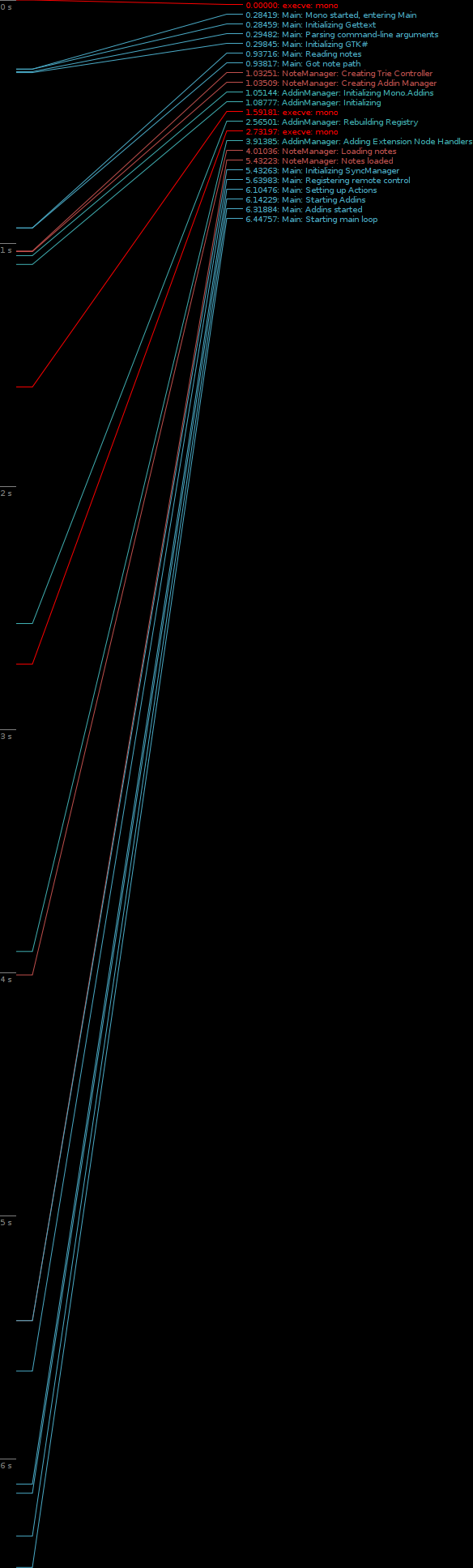
This start-up performance fix was also in 0.15.0, but I didn't realize how significant it was until after I'd already announced it. We found that this simple fix saved us around 25% on Tomboy start-up. On my system, start-up time was cut from 4 seconds to 3 seconds (these are warm starts, I did not have time to test cold starts).

These traces were created using Ruben's patch and Federico's graphing tool. You can click them to see the full graphs (note that apps run slower with tracing turned on). Compare the numbers for setting up our AddinManager in 0.14.1...


...versus the new numbers for 0.14.2...


The funny thing is, all I did was change a couple of lines in our Mono.Addins initialization code to reflect the latest recommendations of the maintainer.

This "free" boost isn't even part of the low-hanging fruit I keep talking about when it comes to Tomboy performance optimizations. I'm working on another fix that should cut down on memory consumption, too, and you should expect performance improvements in every release this cycle. If you would like to help us set up an automated way to track memory usage and start-up time in Tomboy, that would be an awesome contribution. :-)

Following the GNOME schedule, our next development release, Tomboy 0.15.1, is scheduled for May 25. Stay tuned for some exciting announcements!

This post brought to you by the Tomboy Blogposter add-in.

Monday, April 20, 2009

Tomboy 0.14.1, the future, and a word about Gnote

Tomboy 0.14.1 Stable Release for Linux, Windows, and Mac OS X

I'm very proud to announce Tomboy 0.14.1, which represents the beginning of our stable support for Tomboy on all major desktop platforms. Here are some of the major changes since the 0.12.x stable versions:

Searching Notes in Windows


All in all this has been a pretty great cycle for Tomboy. Windows support has been the most-requested Tomboy feature for awhile, and in fact some of my first work on Tomboy three years ago was to make it work at my old Windows-only job. The Windows version has generated interest from a whole new set of users, but most importantly to me, it has gained us several new contributors! Benjamin Podszun, for example, rewrote printing to remove our dependence on the obsolete libgnomeprint, then went on to fix several other bugs and to triage the rest. Since I am not generally a Windows user, it is important to be able to depend on contributors from that world to keep an eye on things.

The Mac port is a little less mature, and we will probably need to get more involved in in the GTK+ implementation on that platform to ensure solid support. Nevertheless, though there are quirks, we are happy to support Tomboy on Mac OS X, too.

Tomboy in your dock (click for full-screen shot)


If you are a GNOME Do user, you may currently be enjoying the wonderful Tomboy plugin, which provides instant access to your notes, and convenient creation of new notes.

Instant note access with GNOME Do


With Tomboy 0.14.1 we have striven to create a solid base on which to build the future of Tomboy. Cross-platform support has given us new contributors and a cleaner code base. We have gotten rid of most of our use of obsolete GNOME APIs. We are off to a great start on profiling and making performance enhancements. Note synchronization is stable on all platforms. Now is the time to make Tomboy really shine.

Looking Forward

For Tomboy 0.16.0, we have a few more fun things planned. The community is having the planning meeting tomorrow, so we'll have our official roadmap soon, but some features I'm currently excited to work on are:
  • Automatic note synchronization between Tomboy(s), G1, iPhone, and the web.
  • Continued improvements to memory usage and overall performance, especially on startup (lots of low-hanging fruit here).
  • Figuring out how best to integrate with gnome-shell, which currently has no specific plans for applet support (which means it's a great time for us to figure out how to make applets awesome in GNOME 3.0!).
The great thing is that most of this work is easy to do in parallel, so now is a wonderful time to join in the hacking.

An old Tomboy Online mockup, stay tuned for news!


A Note about Gnote

Some people have started asking about Gnote, Hubert Figuiere's line-for-line port of Tomboy to C++. Our stance on Gnote is that it is counterproductive to maintain identical software in two languages. It will be harmful to the community, especially as these two apps inevitably diverge. It will result in duplication of effort, duplication of bugs, and a lot of wasted time for those who are trying to add value to the user experience.

Tomboy is not going away, and it will continue to be developed on the extremely productive Mono/GTK# language platform. Anyone thinking about distributing Gnote should consider the impact on users and their data. When we develop, we should always be asking ourselves, "is this adding value for our users?"

Tomboy has a vibrant community, a happy relationship with GNOME, and an exciting future. If you'd like to help us out come to tomorrow's planning meeting, join us on our mailing list, or just start hacking!

This post brought to you by the Tomboy Blogposter add-in.

Monday, February 16, 2009

Tomboy 0.13.5 Brings a Better Windows Installation Experience

Today I released Tomboy 0.13.5. It has a bunch of nice fixes, including updates to Benjamin Podszun's Gtk.Print rewrite of Tomboy's printing add-in (making printing available on all platforms). For Windows users, this is the first time that you should be able to easily install gtk-sharp and Tomboy without having to muck around with your system. But we wouldn't want it to be too easy, so there are some caveats.

From http://live.gnome.org/Tomboy/Installing/Windows :

Instructions for installing a Tomboy Windows release

Upgrading from Tomboy 0.13.4 or earlier
  1. Uninstall Tomboy.
  2. Uninstall any existing versions of gtk-sharp you may have installed.
  3. Continue with Installation instructions.
Installation
  1. Install Novell's gtk-sharp 2.12.8 or newer.
  2. Restart.
  3. Run Tomboy installer 0.13.5 or newer.
  4. Enjoy!
Importing notes from Linux (optional)
  1. On your Linux box, copy all of the *.note files out of ~/.tomboy .
  2. On your Windows box, quit Tomboy.
  3. On your Windows box, copy all the *.note files from Linux into %APPDATA%\tomboy .
Please please please don't hesitate to file bugs for any problems you experience.

Thanks so much to Mike Kestner for working his ass off (on his own time) updating the gtk-sharp installers, making them easier to develop and build, and fixing the issues reported by Tomboy users. Apps like Tomboy, Banshee, and GNOME Do would simply not exist without all of his hard work.

Monday, January 26, 2009

Tomboy 0.13.3, Tomboy 0.12.2, Tasque 0.1.8, and Giver!

There have been some very important Tomboy and Tasque releases in the past month or so that I have neglected to share. I think it's true that Twitter removes a lot of the motivation to blog. Here are the takeaway points:

Shiki-Colors Theme (click for larger version)

So what else is going on? Tomboy 0.13.3 features some fixes that cut down my memory usage by 25% (with ~200 notes). It should also speed up start-up time if you have a big note collection. One user with 621 notes reported a change from 11 seconds to 4 seconds when he upgraded! The fixes were almost all related to extra work done on a per-note basis, so the memory and performance wins are most significant on these large note collections.

That being said, there is a lot more work to do on memory and performance. Ruben Vermeersch blogged about adapting Federico's timeline tracing tools to chart Tomboy start-up performance. This is going to be extremely helpful in figuring out where we're slowing things down. And as for memory usage, I have only fixed the low-hanging fruit; there are more wins to be had! If this is an area of computer science that you find fun, all help is welcome. :-)

Tomboy Startup (click for full-size graph)

My day job of working on the Mono Accessibility team has kept me pretty busy, and it's been hard lately to find time to work on Tomboy and Tasque. Sure, my team understands when I take a few hours every couple of weeks to prepare a Tomboy release, but that doesn't provide enough time for big feature work or difficult bug fixes. For example, we knew about the problems with Tasque and RememberTheMilk.com for a month before we were able to fix it and get a release out. Fortunately, Novell has its cool "ITO" (Innovation Time On) program. I accumulate 4 hours of ITO every week; that's basically the equivalent of 10% time! As I used up all of my regular time off with hospital visits last year, I scheduled four days of ITO during the week of Christmas. I was able to use that time to review a ton of outstanding patches for Tasque, fix the bugs in the RTM and SQLite backends, and make it easy to build on Windows and Mac OS X. This is also when I did all of the memory fixes for Tomboy. So a big thanks to Novell for supporting me in this work.

Lastly, I'm really excited about Ankit Jain's work on Giver. I never worked on Giver, unless you count the moral support I lent during that first Hackweek. :-) But I am amazed at how many people are asking for updates, Windows and Mac versions, etc. As somebody who works from home, Giver isn't that useful to me, but apparently it is very popular and more people are learning about it every day. With Ankit's help, this project may not be so dead after all. You can help him out by testing his Windows builds, trying latest SVN, filing issues, and hanging out in #giver on GIMPNet.

Wednesday, November 26, 2008

Mono Accessibility 0.9 Released!

Yesterday, Brad announced the first release of the Mono Accessibility team's work, which started a little less than a year ago. It's pretty exciting for us to put out this developer preview release; I'm interested to see what people make of it.

The goal of the first phase of our project, which will culminate in a 1.0 release early next year, is to make Winforms applications accessible in Linux with traditional at-spi tools like Orca and Accerciser. In 0.9, we offer support for most Winforms controls (Button, Label, ComboBox, ToolStrip, WebBrowser, etc). In 1.0, we will be rounding out this support to include the remaining controls (DataGridView, TreeView, custom controls, etc), in addition to fixing bugs and improving stability.

It may not sound that exciting to enable accessibility for Winforms apps. After all, you probably aren't using very many on your GNOME desktop today. However, there certainly are some cool open source apps out there (Paint.NET, NClass, etc). And the main benefit will be for overall Linux adoption. There are many businesses, large and small, schools, governments, non-profits, etc...that are stuck on Windows because they have custom applications written using APIs like Winforms. One goal of the Mono project is to provide a migration path for these potential Linux users. Accessibility support is often a requirement, so by making these custom Winforms applications fully accessible in Linux, we are enabling Linux adoption scenarios that would have been too expensive before (rewriting your internal tools is not cheap or easy).

If you are not familiar with our project, let me briefly explain what it is we are doing:

We are implementing Microsoft's "User Interface Automation" (UIA) specification on Linux. During the first phase of our project, we are focusing on the "provider side" of this specification, which offers interfaces that are implemented by the accessibility/automation "provider" for a given control. This is similar to implementing ATK interfaces for a GTK+ widget, if you are familiar with that. We have been writing UIA providers for all of the Winforms controls.

The other half of our work this phase has been creating a bridge from UIA to ATK. This bridge translates between UIA interfaces and ATK roles/states/etc. This is the piece that makes a Winforms application look like a GTK+ app (or any other app written in a toolkit that exposes a11y info over at-spi) in a tool like Orca.


It's pretty cool the way this fits together. Next year, after 1.0 is released, we'll begin the second phase of our project. It includes two major efforts:

First, we will be making Moonlight accessible in the same way we have made Winforms applications accessible. We will create UIA providers for Moonlight controls, and they will automatically gain accessibility via the exiting UIA<->ATK bridge.

Second, we will implement the "client side" of the UIA specification. This is a set of interfaces designed to allow an accessibility tool (think Orca) to interact with accessible applications. It is similar to the at-spi interfaces, and we will in fact be implementing it as another bridge, this time translating "client" UIA calls into equivalent at-spi calls. The benefit here is that as Windows developers create accessibility and automation tools using the UIA interfaces, they will be portable to Linux (and vice versa).

Accessibility is a great feature for users and potential customers. Automation support is invaluable to testers, software QA, and even users who just want to streamline common tasks. With the release of Mono Accessibility 0.9, we are growing the landscape of accessible applications. We look forward to your feedback (and bug reports)!

Monday, August 4, 2008

Tomboy 0.11.1 Released

I finally got some time this weekend to take care of some irritating Tomboy bugs, so today I present to you Tomboy 0.11.1, "A PhD in Horribleness":
  • New tray icon code using GtkStatusIcon (kill libegg, #349265, Stefan Cosma).
  • Fix crashers: #544406, #460642, #544996, #523035
  • Fix bugzilla addin to accept bug IDs of one or more digits (#533024).
  • Fix behavior when start note is recreated (#508982, Jon Lund Steffensen)
  • Include .mdb files during install. Allow --debug, --trace, and --profile options when running Tomboy.
  • Translation updates: ar, bg, ca, de, es, et, fr, gl, he, nb, nl, oc, pt_BR, sk, sv, th, vi, zh_CN
Major things left to do before 0.12.0 is released: Finish port to GtkPrint, fix major outstanding bugs in synchronization, and, if there's time, do some work on startup performance. All help is welcome, especially on the GtkPrint stuff! :-)

Monday, July 14, 2008

GHOP Awards Ceremony

I just finished a great weekend in the San Francisco Bay Area, thanks largely to Google and their Highly-Open Participation Contest (GHOP). As you may already know, Google worked with several open source projects to run a contest for high school-aged students to complete tasks ranging from translation and documentation to coding and other bug fixes. Vincent Untz, Andre Klapper, and Behdad Esfahbod, Lucas Rocha, and Christian Kellner ran things from the GNOME end, and did a great job. Unfortunately the awards ceremony for GHOP grand prize winners was scheduled for this past Friday, and they were busy at GUADEC. Since I had been involved in GHOP as a mentor, I volunteered to represent GNOME at the ceremony. Later, I found out that the Mono project was unable to send a representative as well. Their side was largely administered by Miguel de Icaza and Michael Hutchinson, and Michael asked me to represent them since I was already going to be there. So although I was probably the least-involved mentor at the ceremony, I was also the only one with two students. :-P

GNOME's Grand Prize Winner: Patrick Hulin

Patrick is a junior at Hopkins School in New Haven, CT. He finished several tasks, often swooping in to get the job done after another student bailed. He submitted fixes to Totem and ported baobab from gnome-vfs to gio, in addition to documentation and GTK+ performance tasks. I had a great time meeting him and his parents on Friday. I'm always encouraged to meet teenagers who actually *enjoy* math, and find opportunities to learn about software development. Patrick is going to be a counselor at a local computer camp this summer, brainwashing^W teaching teens the ways of code and circuit. We had a blast in the lobbies at each Google building, watching on a screen as the world's search queries scrolled by.


Mono's Grand Prize Winner: Dan Abramov

Dan is from St. Petersburg, Russia, and came to the ceremony with his mother (who had an awesome camera, I hope I get to see some of her photos from the trip). He's a largely self-taught 16 year old dynamo. He made some nice contributions to Mono, including Gendarme analysis rules and MonoDevelop addins and documentation. One of my favorite moments of this trip is when I was asking Dan about his future plans, did he intend to go to university in Russia, pursue Computer Science, etc. He told me that although he felt confident programming in managed languages like C#, he wanted to understand more about the low-level details. He asked me if I had read Joel Spolsky's article on "leaky abstractions", and described how sometimes .NET/Mono programming could be like that. I could only laugh with joy that this guy was already reading (and understanding) Joel.

Daniel and his mother
I think it's pretty clear that these students have a huge head-start in computer science. Everybody was interested and excited about open source software. I got a lot of questions about what it's like to work on open source software all day at Novell. Being there, it really felt like I was looking at the next generation of open source leaders. I can only hope they stick with it instead of going down the boring path of being a doctor or a lawyer or something. ;-)

Thank you Google for encouraging these kids, and providing incentives like GHOP and Summer of Code to keep them in our world.

The Visit

It was pretty cool to meet the mentor representatives from other open source projects, some of whom were actually Google employees. Friday was a busy day, what with touring the Google campus, having the actual award ceremony, being interviewed for YouTube (eep), and stuffing my face. We saw presentations about App Engine (by Guido van Rossum), Android (Romain Guy), Google infrastructure (Jeff Dean), and testing at Google (Bharat Mediratta and Mike Bland).

My favorite talk by far was the testing one. Bharat and Mike are among the better pair presenters I've seen, so it was a joy just to watch them. But the subject matter is dear to my heart. At my last company I was often frustrated with how difficult it was to proliferate best practices (specifically TDD) even within a single team. I was fascinated to hear how these guys just decided to fix the testing problem at Google, guerrilla-style. They introduced the awesome Testing on the Toilet newsletter, devised testing training and certification programs for projects and employees, and introduced "test mercenaries" to spread skills where needed by hopping from project to project, staying only a few months with each. Ingraining these practices in a company's culture is a singularly difficult problem. Their example is inspiring, though of course it requires constant ongoing work, and it might be difficult to convince any company to invest such significant resources into a never-ending program like that. I've been following the Testing on the Toilet blog for awhile, but meeting these guys was truly invigorating. I wish there had been time to chat them up afterwards!

The Rest

Over the weekend, Ellery and I visited our old stomping grounds at San Francisco State University, Stonestown Borders, and West Portal. We had a fun dinner with Liz and Bernat at Mozzarella Di Bufala. It was nice; I really do miss my friends sometimes. :-) Later we visited some family in the East Bay.

Ellery is Queen of the Campus
The rest of my photos can be seen on my picasaweb. By the way, Lazyweb, do you know how to tag all photos in an album at once?

Wednesday, April 16, 2008

LugRadio Live 2008

Jono
First off, I want to thank John Anderson (sontek in IRC) for letting me join his motley crew of Utah Linux hackers this weekend. Ellery was a little concerned that I might wake up in a tub of ice, but instead I woke up in a bed with Joe. Who would've thunk? Trevor (heartsbane) was a blast to chill with all weekend. My only regret is that the weekend went by so fast that I didn't have much time to hack. John, however, managed to find the time to completely rewrite Tomboy's printing addin to use GtkPrint, which really rocks considering our cross-platform focus for this cycle. Also, we were possibly violating the GPL with borrowed GEdit code, so I feel a lot more warm and fuzzy about the new code. ;-) Joe started working on classic bug #350990, which has caused a few users to really bork their notes by making a few renames. This is awesome because that bug is evil and Joe went through the pain of reinstalling his laptop and getting the whole Mono stack set up so that he could help.

Joe, John, Trevor
Banshee 1.0 was a massive hit at LRL. I worked the openSUSE booth for a few hours each day, and lured dozens of people into my Banshee spiel/demo with the new absolutely rocking Banshee tee-shirts. I spread the word that Aaron and Gabriel would be giving a sweet demo, and sure enough, even though they were relegated to the hard-to-find lightning talk room (only 30 minutes, WTF?), we managed to pack in a full house. Watching Aaron and Gabriel is really an experience. I'm not going to use the word synergy because it's against my religion, but I'm amazed at the flow these two have even though they work half a continent away from one another. The talk was a hit, the demo was a hit, and you can check it out on Google Video.

The only thing that sucked, and yes I will call this out, is that network availability at LRL was complete crap. It's pretty hard to demo podcasts, bitchin' Last.fm integration, internet radio, or DAAP support without an IP. Incidentally, it's also hard to submit patches, live blog, or get the latest source from SVN. For shame, guys, isn't there a solution for this? This was the one shitty thing at LRL and I would gladly pay ten times the entrance fee if it would help fix this.

On Sunday, it seemed that half of the people at LRL were wearing Banshee tee-shirts. Hells yeah!

Gabriel Burt conquers a tower of food
The best thing for me was just meeting everybody and hanging out. I got to talk a lot with Christian Hammond, but I was bummed to miss his Review Board presentation. I finally met Alex Graveley and Miguel, who are such a blast to hang out with. Some people really get it, and it's just refreshing to talk to them. Alex gave a pretty sweet demo of streaming virtual machines, which is actually something I've spent a lot of time thinking about so I was glad to see somebody doing something about it.

Miguel twitters, as I snap a pic for my blog.
I didn't really get to talk to Robert Love, unfortunately, but his Android talk was fairly convincing. I asked him if Android was going to be a real community-driven project, with non-Google folks having commit access, making architectural decisions, etc. I was thinking of the transition Apple has made with WebKit from "here's a code drop" to having a really great community project. Rob assured me that Android would be like that, and I trust him because he knows about economics and hawks and stuff. I'm not much of a Java fan, but I think I'll download the SDK and start messing around a bit. Hell, I may finally be convinced to buy a smartphone.

Travis Reitter (Soylent), Gabriel Burt (Banshee), Erinn (Debian)
You can see all of my pictures on my picasaweb.

Monday, March 10, 2008

A week in Cambridge, a11y status, new Tomboy release, and other hacking


So I spent last week in Cambridge, getting to know Mike and Andres, who just joined the Mono Accessibility team. Aside from consuming massive amounts of seafood, I became a lot more familiar with the project and the entire accessibility landscape. I do wish I'd seen more of Boston, though.


I'm going to start blogging a sort of status report every Monday, to keep everybody informed about what I've done and what I'll be doing as part of implementing UIA on Linux. This is the first such entry. Last week was kind of a wash for development, but I did help get Mike and Andres set up, verify some of our unit tests against the MS UIA implementation in my new Vista VM, and delve into winforms code. We need some way to know when new Forms are created so that we can register them in the UIA-ATK bridge, but once they are created, I believe we can implement the UIA "provider" interfaces with just regular access to the public members of forms and their controls. Though I've been warned that it may be necessary to hook in a bit lower in the winforms code...

This week I intend to start implementing some basic UIA providers (window, button, etc). I'll drop some code into winforms to alert me when new forms are created, and since the UIA-ATK bridge is not quite ready, I'll write a few tests directly against the provider interfaces. Should be fun!

In other news, Boyd just released Tomboy 0.10.0! This is a nice release with a lot of polish. I think people are really going to like Notebooks...I'm looking forward to feedback that should let us know if we were right or wrong in going with Notebooks instead of free-form tagging (which is totally supported in the implementation, if anybody wants to write an addin or dbus client). I'm sure that we'll get a lot of good suggestions from our users, as usual. Soon we'll have a meeting to plan our next release, so keep your ears open!


I've also been spending some time on Tasky, which I'm liking a lot better than the other task programs I've tried. In general I like RTM's Gmail extension for Firefox, but its mouse dependence really slows me down. My favorite RTM/Gmail feature is how I can type in a task like "lunch today" or "release tomboy 0.10.0 march 10th", and it will become "lunch" or "release tomboy 0.10.0" with the proper due date set. I've implemented this for Tasky, though I don't yet support as many natural language phrases as RTM/Gmail does (we don't appear to have a cool library like Chronic for .NET). Hopefully some variation on my patch will make it into trunk, as I think this is the easiest way to type in tasks with a due date. What do you think?


Other things I'd love to hack on when I have time: offline Tasky for RTM, DAAP client support in Banshee trunk, and better refactoring support in MonoDevelop (like typing out a new method call, right-clicking the method, and choosing "Implement method"). I'll save my Tomboy thoughts for a future entry...

Saturday, January 12, 2008

Middle-click on Tomboy Applet

UPDATE: Bug resolved with patch that adds a gconf preference defaulting to false. There is no UI to toggle this preference. The relevant key is /apps/tomboy/enable_icon_paste.

As posted to tomboy-list...

With regards to bug #359167, does anybody actually use this feature?

Most GNOME applets let you move them by middle-click-dragging. With Tomboy, when you middle-click on the applet (or notification icon), any text in the clipboard is pasted to the Start Here note, which is opened for you. I don't think this is documented anywhere.

Would you care if this feature went away?

Personally, I never use the Start Here note, so I'm probably not qualified to judge whether or not it is a useful feature.